If you’ve ever received a Google warning mentioning automated queries, seen a CAPTCHA appear after performing numerous searches, or wondered how SEO tools collect ranking data, you’re not alone.
Automated queries are a topic that often causes confusion among website owners, marketers and SEO professionals. Many assume they simply refer to bots or search engine crawlers, while others believe every SEO tool violates Google’s policies. The reality is far more nuanced.
Understanding what automated queries are—and more importantly, what Google considers acceptable—is essential for anyone involved in search engine optimisation, competitor analysis, keyword research or digital marketing. Using the wrong approach can result in temporary IP blocks, CAPTCHAs or breaches of Google’s Terms of Service, whereas using approved methods allows you to gather valuable search insights safely and responsibly.
In this guide, we’ll explain how automated queries work, why Google limits them, the risks involved, and the safest ways to collect search data without causing problems.
What Are Automated Queries?
An automated query is a search request sent to Google by software rather than a person manually typing a search into a browser.
Instead of opening Google, entering a keyword and clicking Search, an automated system performs those actions programmatically. This software might send hundreds—or even thousands—of search requests without human interaction.
Google describes automated queries as requests generated by software that access its search results without manual user input. Because these requests can consume significant infrastructure resources and may be used for scraping or abuse, Google restricts many forms of automated access.
Examples include:
- Automated rank-checking scripts
- Browser automation software
- SERP scraping tools
- Python scripts requesting Google Search pages
- Selenium browser automation
- Custom SEO monitoring software
- Large-scale keyword checking applications
Not every automated process is prohibited. Google provides several official APIs and services that allow developers to access certain types of Google data in approved ways.
The important distinction is how the requests are made.
Human Searches vs Automated Queries
Although both eventually retrieve search results, the process behind them is very different.
A manual search typically follows this pattern:
- A user opens their web browser.
- They visit Google Search.
- They type a query.
- Google generates results.
- The user decides whether to perform another search.
An automated query removes most or all of the human involvement.
Instead, software can:
- Generate keywords automatically
- Submit requests continuously
- Parse search result pages
- Store ranking data
- Repeat the process thousands of times
This automation makes data collection much faster, but it also increases the load placed on Google’s systems.
That is one of the primary reasons Google regulates automated querying.
Why Does Google Restrict Automated Queries?
Google processes billions of searches every day. If unrestricted software continuously generated additional automated requests, the impact on Google’s infrastructure would be substantial.
Google’s restrictions are designed to balance legitimate usage with the stability and fairness of its search platform.
Protecting Google’s Infrastructure
Every search request consumes computing resources.
When thousands of automated systems repeatedly request search results, they increase server load, bandwidth consumption and processing requirements.
Limiting automated queries helps Google maintain fast search performance for genuine users.
Preventing Search Abuse
Automated software is frequently used for activities such as:
- SERP scraping
- Data harvesting
- Mass rank checking
- Spam research
- Artificial intelligence data collection
- Large-scale competitive monitoring
Without restrictions, malicious actors could continuously collect Google’s search data for purposes that undermine the quality or fairness of the search ecosystem.
Maintaining Search Quality
Google invests heavily in improving search quality.
Allowing unrestricted automated access would make it easier for organisations to reverse-engineer ranking behaviour, manipulate search results or exploit weaknesses within Google’s algorithms.
Restricting automated queries helps preserve the integrity of Google’s ranking systems.
Ensuring Fair Access
Every Google user expects search results to load quickly.
If excessive automated traffic overwhelmed Google’s infrastructure, ordinary users would experience slower searches, reduced reliability and poorer overall performance.
Google’s policies help ensure that search remains responsive for everyone rather than being dominated by large-scale automated systems.
How Automated Queries Actually Work
At a technical level, an automated query follows the same general process as a manual search.
The difference lies in who—or what—is performing the request.
Instead of a human typing:
best SEO tools
Software may automatically generate hundreds of searches such as:
- best SEO tools
- best link building tools
- keyword research software
- SEO reporting tools
- technical SEO audit checklist
The software then collects the returned search results for analysis.
Depending on the application, it may record:
- Ranking positions
- URLs
- Titles
- Meta descriptions
- Featured snippets
- People Also Ask results
- AI Overviews (where available)
- Local Pack appearances
Some systems repeat this process every hour or every day to monitor ranking changes.
From an SEO perspective, this information is valuable because it allows marketers to track visibility over time.
However, repeatedly requesting Google’s search pages directly can violate Google’s Terms of Service when performed without authorisation.
Technologies Commonly Used for Automated Queries
Several technologies can generate automated search requests.
Python Scripts
Python is widely used for automation because it offers libraries that can send HTTP requests and process HTML responses.
Developers often create scripts to:
- Check rankings
- Collect SERP data
- Monitor competitors
- Gather keyword suggestions
While technically straightforward, directly scraping Google Search results may breach Google’s policies.
Browser Automation
Frameworks such as Selenium can simulate a real browser.
They automatically:
- Open Chrome
- Visit Google
- Type keywords
- Click Search
- Capture the results
- Repeat the process
Because these actions imitate genuine browsing behaviour, many beginners incorrectly assume they are permitted.
In reality, Google focuses on how requests are generated rather than whether they originate from a visible browser.
Headless Browsers
Modern automation often relies on headless browsers.
These browsers perform searches without displaying a graphical interface, allowing software to execute large numbers of requests efficiently.
Common examples include:
- Headless Chrome
- Playwright
- Puppeteer
These tools are legitimate development frameworks, but using them to scrape Google Search at scale may still violate Google’s policies.
Why SEO Professionals Are Interested in Automated Queries
The SEO industry relies heavily on search data.
Professionals regularly need to know:
- Which keywords are gaining visibility
- Which competitors have improved rankings
- Whether algorithm updates affected a website
- How featured snippets change
- Which pages appear for specific search intent
Manually checking thousands of keywords every day would be impossible.
Automation therefore became a natural solution.
Modern SEO platforms simplify this process by collecting and organising ranking information at scale. However, reputable platforms invest heavily in compliant data collection methods, licensing arrangements and proprietary systems rather than encouraging users to scrape Google directly.
That distinction becomes particularly important when choosing SEO software.
Examples of Automated Queries
Automated queries appear in many different forms. Some are legitimate and operate through approved interfaces or licensed data sources, while others interact directly with Google’s search results in ways that may breach Google’s Terms of Service.
Understanding the difference helps businesses choose the right tools without creating unnecessary risk.
Rank Tracking Software
One of the most common uses of automated queries is keyword rank tracking.
Instead of manually searching Google every morning to check where your website ranks for hundreds of keywords, specialised SEO software performs these checks automatically and stores the results in a dashboard.
For example, a business targeting keywords such as:
- SEO audit services
- Link building services
- Guest posting services
- Local SEO agency
would find it impractical to check every keyword manually across desktop and mobile devices, different locations and multiple competitors.
Rank tracking software automates much of this process, allowing marketers to monitor ranking trends over weeks and months rather than relying on occasional manual checks.
Professional SEO platforms also provide additional context, including:
- Ranking history
- Visibility scores
- SERP features
- Competitor movements
- Estimated traffic changes
Rather than simply displaying a number beside a keyword, these platforms help identify wider trends that influence SEO strategy.
SERP Scraping
SERP scraping refers to extracting information directly from Google’s search results.
A scraper may automatically collect:
- Search result URLs
- Titles
- Meta descriptions
- Featured snippets
- Related searches
- People Also Ask questions
- AI-generated search features (where available)
This data is often analysed to identify competitor strategies or monitor ranking changes.
Although scraping technology itself is not inherently malicious, directly scraping Google Search at scale without authorisation may violate Google’s policies.
Businesses should therefore distinguish between collecting publicly available information and repeatedly sending unauthorised automated requests to Google’s search infrastructure.
Browser Automation
Modern automation software can control a browser in the same way a human would.
Instead of typing keywords manually, browser automation tools can:
- Open Chrome
- Visit Google Search
- Enter search terms
- Click Search
- Save the results
- Repeat the process automatically
From a technical perspective, the browser behaves normally.
However, Google’s systems can still recognise patterns that indicate automated behaviour rather than genuine user activity.
Using a visible browser does not automatically make automated querying acceptable.
Python Scripts
Python remains one of the most popular programming languages for SEO automation.
Developers often build scripts that perform tasks such as:
- Keyword monitoring
- Competitor research
- SERP analysis
- Position tracking
- Search result collection
Python libraries make these tasks relatively straightforward.
For example, a script could:
- Read a list of keywords.
- Perform searches automatically.
- Extract ranking URLs.
- Save the data into a spreadsheet.
- Repeat the process every morning.
While technically effective, directly automating Google Search requests should be approached carefully because repeated querying may conflict with Google’s usage policies.
Selenium Automation
Selenium is widely used for browser testing.
Developers originally designed it to automate quality assurance rather than SEO data collection, but many users discovered it could also perform automated Google searches.
Typical Selenium workflows include:
- Launching Chrome
- Visiting Google
- Searching for keywords
- Capturing rankings
- Closing the browser
- Repeating the process
Because Selenium behaves like a browser, beginners often assume Google cannot distinguish it from human users.
In reality, Google evaluates many behavioural signals beyond whether Chrome is being used.
Headless Browsers
Headless browsers perform the same actions as standard browsers but without displaying a graphical interface.
Popular examples include:
- Headless Chrome
- Playwright
- Puppeteer
These frameworks are widely used in software development, testing and website automation.
Like Selenium, they become problematic only when they generate large volumes of unauthorised automated search requests.
Mass Keyword Checking
Some organisations attempt to monitor tens of thousands of keywords every day.
Imagine an international retailer operating in:
- United Kingdom
- United States
- Canada
- Australia
Tracking 15,000 keywords manually would be impossible.
Automation becomes essential.
The challenge lies in collecting this data responsibly.
Professional SEO platforms invest heavily in scalable infrastructure and compliant methodologies rather than encouraging customers to repeatedly scrape Google Search directly.
Are Automated Queries Against Google’s Policies?
This is where many misconceptions begin.
People often assume all automation is prohibited, while others believe anything an SEO tool does must automatically be approved by Google.
Neither assumption is entirely correct.
Google’s concern is primarily with unauthorised automated access to Google Search itself.
According to Google’s Terms of Service, users should not access Google’s services through automated means except where Google explicitly provides permission, such as through official APIs or other authorised interfaces.
In practical terms, Google discourages activities including:
- Automated scraping of search results
- Large-scale keyword querying
- Unauthorised data extraction
- High-frequency automated searches
- Software generating excessive requests
This policy exists to protect Google’s infrastructure and maintain fair access for all users.
Acceptable Forms of Automation
Google itself provides several approved ways to automate certain tasks.
Examples include:
- Google Search Console
- Search Console API
- Google Ads API
- PageSpeed Insights API
- Google Analytics APIs
- Google Programmable Search Engine
These services are specifically designed to support automation within defined usage limits.
When developers use these official interfaces, they operate within Google’s intended ecosystem rather than bypassing it.
What About SEO Tools?
A common question is:
“If Google restricts automated queries, why do tools like Semrush or Ahrefs exist?”
The answer is more complicated than many people realise.
Professional SEO platforms do far more than simply submit automated Google searches.
They typically combine:
- Proprietary crawlers
- Historical databases
- Licensed datasets
- Multiple data sources
- Machine learning
- Independent web indexes
- Aggregated search intelligence
This allows them to provide keyword rankings, backlink data and competitor insights without requiring individual users to automate Google Search themselves.
For businesses, using an established SEO platform is generally a far safer and more practical option than building custom scraping software.
Can Automated Queries Get You Blocked?
Yes.
If Google detects behaviour that appears automated or abusive, it may temporarily limit access. The exact response depends on several factors, including request volume, frequency and behaviour patterns.
Possible responses include:
CAPTCHA Challenges
One of the most common signs is a CAPTCHA asking users to verify they are human.
This helps Google distinguish genuine users from automated software.
Temporary Rate Limiting
Google may slow or temporarily block additional requests from a particular IP address after detecting unusually high search activity.
This often resolves automatically after a period of reduced activity.
IP Restrictions
In more persistent cases, an IP address generating excessive automated traffic may experience temporary access restrictions.
For organisations using shared office networks, this can affect multiple users if large-scale automation originates from the same connection.
Automated Query Warning Messages
Some users encounter messages stating that Google has detected unusual traffic from their computer network.
These warnings generally indicate that Google’s systems believe automated requests—or behaviour resembling automation—are occurring.
Receiving such a message does not necessarily mean someone intentionally violated Google’s policies. Browser extensions, shared networks, VPNs, or poorly configured software can sometimes trigger similar behaviour.
Real-World Scenario
Imagine an SEO agency wants to monitor 8,000 keywords across multiple countries.
Approach One
A developer creates a custom Python script that searches Google every few seconds for every keyword.
Within a short period:
- thousands of requests reach Google
- CAPTCHA challenges begin appearing
- searches slow dramatically
- the office IP may be temporarily restricted
Approach Two
The agency instead uses an established enterprise SEO platform that provides historical ranking databases, scheduled monitoring and structured reporting.
The team receives:
- ranking history
- competitor visibility
- keyword trends
- reporting dashboards
- automated alerts
without building its own large-scale search automation.
From a business perspective, the second approach is significantly more scalable, reliable and sustainable.
How Does Google Detect Automated Queries?
Google does not rely on a single signal to determine whether searches are being performed by software. Instead, its systems evaluate numerous behavioural and technical indicators to distinguish normal human activity from automated behaviour.
This means simply disguising automation as a browser session is unlikely to guarantee that requests appear legitimate.
Google continually improves its detection methods to protect the quality and availability of Search while preventing abuse.
Request Frequency
One of the most obvious indicators is the number of requests made over a short period.
A typical user may perform:
- 20 searches during an hour
- 50 searches across a working day
- Occasional bursts while researching
An automated script, however, might generate:
- 500 searches in ten minutes
- Thousands of keyword requests every hour
- Continuous searching 24 hours a day
Patterns like these differ significantly from normal human behaviour and are far more likely to trigger Google’s protective systems.
User Behaviour
Real users interact naturally with search results.
Typical behaviour includes:
- Reading snippets
- Clicking different results
- Spending time on websites
- Returning to Google
- Refining searches
- Changing wording
Automated software often behaves very differently.
It may:
- Search instantly
- Extract HTML
- Ignore the results
- Perform another search immediately
- Repeat this thousands of times
The absence of natural browsing behaviour can become another indicator of automation.
IP Address Reputation
Google also evaluates where requests originate.
Large numbers of searches coming from:
- Data centres
- Proxy networks
- VPN services
- Cloud servers
may receive additional scrutiny compared with ordinary residential internet connections.
This does not mean VPNs or cloud infrastructure are prohibited, but repeated high-volume querying from these environments is more likely to resemble automated activity.
Browser Fingerprinting
Modern browsers expose numerous technical characteristics.
Examples include:
- Browser version
- Operating system
- Screen size
- Installed fonts
- Language settings
- Rendering capabilities
- Device characteristics
Google can compare these signals with expected patterns of genuine browser usage.
Automation frameworks sometimes produce fingerprints that differ from ordinary user environments, making detection easier.
Cookies and Session Behaviour
Human users build browsing sessions over time.
Google observes behaviour such as:
- Previous searches
- Click patterns
- Navigation history
- Time between actions
- Cookie activity
Automated software frequently creates short, repetitive sessions that lack these normal behavioural characteristics.
Behavioural Analysis
Perhaps the most sophisticated element is behavioural modelling.
Instead of asking:
“Is this Chrome?”
Google asks broader questions such as:
- Does this look like normal human activity?
- Are searches occurring at realistic intervals?
- Are users clicking results?
- Is there meaningful interaction?
- Is the behaviour consistent with ordinary browsing?
Machine learning allows Google to recognise unusual patterns far more effectively than relying on simple technical checks.
For this reason, attempting to disguise automated querying rarely provides a long-term solution.
Legitimate Ways to Access Google Data
The good news is that Google offers several approved methods for accessing data without relying on unauthorised automated searches.
These tools are specifically designed for developers, marketers and businesses.
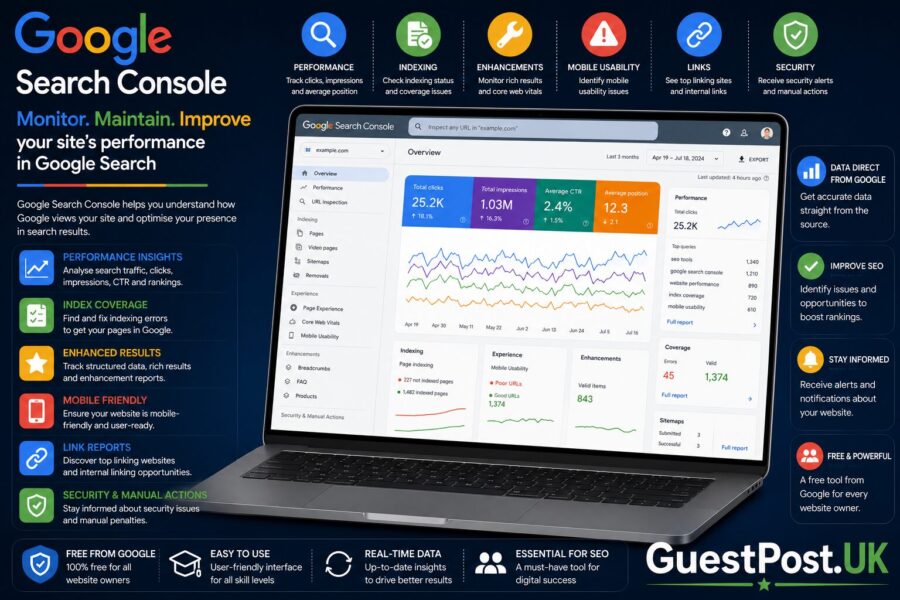
Google Search Console
Google Search Console is the most valuable free resource for website owners.
Instead of collecting ranking information by repeatedly searching Google, Search Console provides verified data directly from Google itself.
It includes information such as:
- Search impressions
- Clicks
- Average position
- Queries
- Indexed pages
- Coverage issues
- Core Web Vitals
- Page performance
For most businesses, Search Console should be the primary source of search performance data.
If you haven’t configured it properly yet, our guide on Google Search Console can help you make the most of the platform.
Search Console API
The Search Console API allows developers to retrieve Search Console data programmatically.
This enables:
- Automated reporting
- SEO dashboards
- Client reports
- Historical analysis
- Scheduled exports
Because Google officially provides this API, it represents a compliant method of automating access to your own search performance data.
Google Ads Keyword Planner
Keyword Planner provides search volume estimates, keyword ideas and commercial search data for advertisers.
Although designed for Google Ads campaigns, it remains a useful source of keyword research information.
Many SEO professionals combine Keyword Planner with other tools to evaluate keyword opportunities.
Google Programmable Search Engine
Businesses that need search functionality within their own websites can use Google’s Programmable Search Engine.
Rather than scraping Google Search directly, this service provides an approved framework for building customised search experiences.
PageSpeed Insights API
Performance data can also be retrieved through Google’s PageSpeed Insights API.
Developers commonly use it to automate:
- Speed testing
- Core Web Vitals reporting
- Performance monitoring
- Lighthouse analysis
Again, this is an example of automation that Google actively supports.
Automated Queries vs Web Crawling
These two concepts are often confused, but they perform very different functions.
| Automated Queries | Web Crawling |
|---|---|
| Searches Google | Visits websites directly |
| Requests Google Search results | Downloads web pages for indexing |
| Often focuses on rankings | Focuses on page discovery |
| May violate Google’s policies when unauthorised | Standard behaviour for search engines |
| Usually performed by SEO software or scripts | Performed by search engine crawlers like Googlebot |
A web crawler such as Googlebot visits websites to discover and index content.
An automated query, on the other hand, asks Google to return search results repeatedly.
The distinction is important because Google encourages website crawling but restricts many forms of unauthorised search automation.
Automated Queries vs Google’s Official APIs
Another common misunderstanding is assuming APIs and automated queries are the same thing.
They are not.
Google APIs are specifically designed to allow controlled automation within defined limits.
| Feature | Automated Queries | Official Google APIs |
|---|---|---|
| Authorised by Google | Usually no | Yes |
| Designed for automation | No | Yes |
| Usage limits | Not intended | Clearly documented |
| Data reliability | Varies | Official Google data |
| Long-term stability | Unpredictable | Stable and supported |
| Risk of violating policies | Higher | Significantly lower |
Whenever Google provides an official API, it should generally be preferred over building custom automation against Google Search itself.
Why SEO Professionals Use Automated Queries
SEO is a data-driven discipline.
Without automation, many routine tasks would consume enormous amounts of time.
For example, agencies often manage:
- Hundreds of websites
- Thousands of landing pages
- Tens of thousands of keywords
- Multiple countries
- Several competitors for each client
Attempting to monitor this information manually would be unrealistic.
Automation helps SEO professionals:
Track Keyword Rankings
Monitoring search visibility over time allows agencies to identify:
- Ranking improvements
- Keyword declines
- Algorithm update impacts
- Seasonal trends
- Competitor gains
Historical data is often more valuable than a single ranking snapshot.
Monitor Competitors
Competitor monitoring helps identify:
- New content
- Ranking improvements
- Lost rankings
- Emerging topics
- Changes in search intent
Combined with a keyword gap analysis, this information can reveal opportunities where competing websites are attracting traffic that your own website is currently missing.
Improve Content Strategy
Automated monitoring helps identify:
- New keyword opportunities
- Frequently updated topics
- Search trends
- Growing industries
- Declining interest areas
Rather than creating content based purely on assumptions, marketers can make decisions using measurable search data.
Generate SEO Reports
Agencies frequently produce:
- Weekly reports
- Monthly reports
- Executive dashboards
- Client summaries
Automation reduces repetitive work while improving reporting consistency.
Instead of copying ranking positions manually into spreadsheets, reporting platforms can automatically assemble structured dashboards.
Our SEO Client Reporting guide explains how automated reporting can save time while improving communication with clients.
Identify Technical Issues
Automation also assists with technical SEO by monitoring:
- Broken pages
- Indexing changes
- Redirect issues
- Crawl errors
- Site performance
- Page speed
These tasks rely on automation, but they typically use approved methods or website crawling rather than repeatedly querying Google Search.
Responsible Automation Is the Key
Automation itself is not the problem.
Modern SEO would be almost impossible without automated systems. The important distinction is how the automation collects information.
Responsible SEO professionals generally prioritise:
- Official Google APIs
- Google Search Console
- Reputable SEO platforms
- Approved data sources
- Responsible crawling of their own websites
rather than attempting to build large-scale systems that repeatedly query Google Search directly.
Best Practices for SEO Professionals
Automation is an essential part of modern SEO, but it should always be implemented responsibly. The goal is not simply to collect more data—it is to collect reliable data in ways that comply with Google’s policies and genuinely improve decision-making.
Whether you’re managing a personal blog or hundreds of client websites, following a few best practices will help you gain valuable insights without introducing unnecessary risks.
Use Google Search Console as Your Primary Data Source
If you own or manage a website, Google Search Console should be your first source of search performance data.
Unlike third-party estimates, Search Console provides information directly from Google, including:
- Search impressions
- Organic clicks
- Average ranking positions
- Indexed pages
- Search queries
- Core Web Vitals
- Coverage reports
Because this information comes directly from Google, it is generally more reliable than manually checking search results or building your own scraping tools.
Before investing in additional software, ensure your Search Console account is configured correctly and reviewed regularly.
Use Official Google APIs Whenever Possible
Google offers several APIs specifically designed for automation.
These services provide structured data while remaining within Google’s intended ecosystem.
Examples include:
- Search Console API
- Google Analytics Data API
- PageSpeed Insights API
- Google Ads API
- Google Business Profile APIs
If Google already provides an official method for retrieving data, there is rarely a good reason to automate Google Search directly.
Official APIs also tend to be:
- Better documented
- More stable
- Easier to maintain
- Less likely to change unexpectedly
Choose Established SEO Platforms
Professional SEO software exists because collecting, organising and interpreting search data is extremely complex.
Instead of developing custom scripts, many agencies rely on platforms such as:
- Semrush
- Ahrefs
- SE Ranking
- Moz Pro
- AccuRanker
- Mangools
These platforms combine multiple datasets, historical records and proprietary technology to deliver actionable SEO insights.
Rather than focusing solely on ranking positions, they also provide:
- Keyword difficulty
- Backlink analysis
- Competitor visibility
- Site audits
- Content recommendations
- Technical SEO monitoring
For most businesses, these tools offer a far better return on investment than maintaining custom search automation.
Automate Reporting, Not Google Searches
One of the safest uses of automation is reporting.
For example, agencies can automate:
- Monthly client reports
- Ranking summaries
- Organic traffic dashboards
- Technical SEO audits
- Site health monitoring
These reports often pull information from approved data sources such as Search Console, Google Analytics and established SEO platforms.
Automation saves time without placing unnecessary demand on Google’s search infrastructure.
Focus on Business Metrics
Rankings matter, but they should never become the only performance indicator.
Instead, automation should help answer questions such as:
- Are organic leads increasing?
- Is qualified traffic growing?
- Which landing pages generate enquiries?
- Which keywords produce revenue?
- Which competitors are improving?
Collecting thousands of ranking positions has little value if those numbers never influence business decisions.
The best automation supports meaningful SEO strategy rather than creating more spreadsheets.
Common Misunderstandings About Automated Queries
Because Google’s policies can appear technical, several myths continue to circulate within the SEO industry.
Let’s address some of the most common ones.
“Using Semrush Means I’m Violating Google’s Policies.”
No.
Using a professional SEO platform is very different from building your own automated system that repeatedly queries Google Search.
Platforms like Semrush invest heavily in proprietary infrastructure, multiple datasets and alternative data sources.
Users access processed SEO information rather than directly automating Google searches themselves.
“Refreshing Google Several Times Counts as Automated Queries.”
No.
Repeated manual searches performed by a person are not normally considered automated queries.
However, refreshing search results hundreds of times in rapid succession or repeatedly using browser automation could still trigger Google’s protective systems.
The distinction is whether software—not a human—is generating the requests.
“Selenium Is Illegal.”
No.
Selenium is a legitimate browser automation framework used throughout software development.
Many organisations use Selenium for:
- Website testing
- Quality assurance
- Application testing
- Browser compatibility testing
Problems arise only when Selenium is used to automate activities that breach another service’s terms or generate excessive unauthorised requests.
The software itself is not the issue.
“Google Blocks Every Automated Request.”
Not necessarily.
Google provides several approved ways to automate access to data.
Examples include:
- Search Console API
- Google Analytics APIs
- Google Ads APIs
- PageSpeed Insights API
Automation becomes problematic when software attempts to collect Google Search results through unauthorised methods.
“Browser Extensions Cannot Trigger Automated Queries.”
Some browser extensions automatically interact with search engines.
Examples include extensions that:
- Check rankings
- Generate keyword suggestions
- Analyse search results
- Scrape SERPs
Poorly designed extensions that repeatedly access Google Search may contribute to behaviour resembling automated queries.
Choose reputable browser extensions and review the permissions they request.
“AI Tools Always Perform Automated Queries.”
Artificial intelligence itself is not the issue.
Many AI applications generate content, summarise documents or analyse data without querying Google Search at all.
However, AI agents designed to repeatedly search Google automatically may still fall under Google’s automated query restrictions depending on how they operate.
The determining factor is not whether AI is involved but how Google Search is being accessed.
Graph-Style Explanation: Automation vs Risk
Imagine a simple graph.
The horizontal axis represents the level of automation, while the vertical axis represents the potential risk of violating Google’s policies.
As automation increases, so does the importance of using approved methods.
Low Risk
│
│  Manual Google searches
│
│
│  Google Search Console
│
│
│  Official Google APIs
│
│
│  Professional SEO platforms
│
│
│  Browser automation
│
│
│  Custom SERP scraping scripts
│
│
│  Large-scale automated Google querying
│
└──────────────────────────────────────────────►
            Increasing Automation
The graph demonstrates an important principle.
Automation itself does not create risk.
Instead, risk increases when automation bypasses approved services and repeatedly requests Google’s search results directly.
Recommended Tools for Safe Google Data Collection
If your goal is to improve SEO rather than simply collect raw search results, there are numerous tools that provide safer and more comprehensive insights.
Google Search Console
Best for:
- Organic performance
- Search queries
- Index coverage
- Technical SEO
- Core Web Vitals
Ideal for every website owner.
Google Analytics 4
Best for:
- User behaviour
- Conversion tracking
- Organic landing pages
- Engagement metrics
Pairs naturally with Search Console to connect rankings with business performance.
Google Keyword Planner
Best for:
- Keyword discovery
- Search volume estimates
- Commercial intent research
Useful for both SEO planning and paid search campaigns.
Semrush
Best for:
- Keyword research
- Competitor analysis
- Rank tracking
- Technical audits
- Content planning
A comprehensive solution for agencies and growing businesses.
Ahrefs
Best for:
- Backlink analysis
- Link-building research
- Competitor link profiles
- Content Explorer
One of the strongest tools for authority analysis.
SE Ranking
Best for:
- Affordable rank tracking
- Website auditing
- Keyword monitoring
- Small business SEO
Suitable for freelancers and smaller agencies seeking an all-in-one platform.
Moz Pro
Best for:
- Beginner-friendly SEO
- Domain analysis
- Keyword tracking
- Link metrics
An accessible choice for businesses new to SEO.
Screaming Frog SEO Spider
Best for:
- Website crawling
- Technical SEO
- Broken links
- Redirect analysis
- Metadata audits
Unlike automated Google queries, Screaming Frog primarily crawls your own website, making it an invaluable technical SEO tool.
Choosing the Right Approach
There is no single solution suitable for every organisation.
A small local business may only need:
- Google Search Console
- Google Analytics
- Google Alerts
A growing marketing agency may additionally require:
- Semrush
- Ahrefs
- Rank tracking software
- Technical crawling tools
- Automated reporting dashboards
Enterprise SEO teams often integrate multiple APIs, reporting platforms and internal analytics systems to monitor thousands of pages efficiently.
Regardless of company size, the underlying principle remains the same:
Use automation to improve decision-making—not to generate unnecessary search requests.
Frequently Asked Questions About Automated Queries
What are automated queries?
Automated queries are search requests sent to Google by software instead of a person manually performing a search. They are commonly used for tasks such as rank tracking, competitor monitoring, keyword research and data collection. Google’s policies distinguish between authorised automation, such as official APIs, and unauthorised methods that repeatedly access Google Search directly.
Are automated queries illegal?
No. Automated queries are not illegal in themselves. However, certain methods of accessing Google Search may violate Google’s Terms of Service if they generate unauthorised automated requests or scrape search results without permission.
Can Google detect automated queries?
Yes. Google uses a combination of behavioural analysis and technical signals to identify unusual search activity.
These signals may include:
- Request frequency
- IP reputation
- Browser behaviour
- Session activity
- Device characteristics
- Click patterns
- Machine learning models
Rather than relying on one indicator, Google evaluates the overall behaviour of the requests.
Can automated queries get my IP address blocked?
They can.
If Google believes your network is generating excessive automated searches, it may temporarily:
- Display CAPTCHA challenges
- Rate-limit requests
- Show “unusual traffic” warnings
- Restrict searches from the affected IP address
These restrictions are often temporary but can interrupt normal browsing and research.
Are SEO tools like Semrush or Ahrefs considered automated queries?
Professional SEO platforms automate many SEO tasks, but they are significantly different from building your own software that repeatedly queries Google Search.
Platforms such as Semrush, Ahrefs and SE Ranking combine proprietary databases, licensed datasets, independent crawlers and historical information to provide SEO insights without requiring individual users to automate Google Search directly.
Does Google Search Console use automated queries?
No.
Google Search Console provides website performance data directly from Google’s own systems.
When you use Search Console or its official API, you are accessing information through an authorised service rather than repeatedly querying Google Search.
For most website owners, Search Console should be the primary source of search performance data.
Can Python scripts scrape Google Search?
Python can technically automate browser activity and collect publicly available web pages.
However, repeatedly sending automated Google Search requests through Python scripts may conflict with Google’s policies if performed without authorisation.
If your objective is reporting or website analysis, official APIs and established SEO tools are usually the safer approach.
Is Selenium allowed?
Selenium itself is a legitimate browser automation framework.
It is widely used for:
- Website testing
- Software quality assurance
- Browser compatibility testing
- Application automation
The software is not prohibited.
Problems arise only when Selenium is used to automate activities that breach another platform’s usage policies, including excessive automated access to Google Search.
Are browser extensions considered automated queries?
Some browser extensions automatically interact with search engines.
Whether they become problematic depends on how they operate.
Well-designed extensions generally work within reasonable limits, while poorly designed extensions that repeatedly generate automated searches may contribute to unusual traffic patterns.
Install browser extensions carefully and only from trusted developers.
What’s the safest way to automate SEO data collection?
For most businesses, the safest workflow combines:
- Google Search Console
- Google Analytics 4
- Official Google APIs
- Professional SEO platforms
- Technical SEO crawlers
This approach provides comprehensive SEO insights while avoiding unnecessary automated interaction with Google Search itself.
Final Verdict: Should You Use Automated Queries?
Automation has become an essential part of modern SEO. Without it, agencies and businesses would struggle to monitor thousands of keywords, analyse competitors, generate reports or identify technical issues efficiently.
The key lesson is that automation itself is not the problem.
The important distinction lies in how the data is collected.
If your automation relies on Google’s official services, trusted APIs or reputable SEO platforms, you are generally following a far safer and more sustainable approach than attempting to build custom systems that repeatedly query Google Search directly.
Which Approach Should Beginners Use?
If you’re new to SEO, start with free and official tools:
- Google Search Console
- Google Analytics 4
- Google Alerts
- Google Keyword Planner
These platforms provide reliable insights without requiring technical automation or scripting.
Which Approach Is Best for Businesses?
Growing businesses should combine Google’s official tools with professional SEO software that supports:
- Keyword research
- Competitor monitoring
- Rank tracking
- Technical auditing
- Performance reporting
This allows marketing teams to make informed decisions while remaining focused on measurable business outcomes rather than individual ranking fluctuations.
Which Approach Is Best for Agencies?
SEO agencies typically require more advanced workflows.
The most effective setup usually combines:
- Google Search Console
- Search Console API
- Semrush or Ahrefs
- Technical crawling software
- Automated client reporting
- Internal dashboards
This combination enables agencies to monitor multiple websites efficiently without relying on risky automation techniques.
When Should You Avoid Automated Queries?
Avoid creating custom software that:
- Continuously searches Google
- Scrapes search results at scale
- Generates excessive automated requests
- Attempts to bypass Google’s protections
Even if these methods appear to work temporarily, they introduce unnecessary technical, operational and compliance risks.
Focus on Better SEO, Not More Searches
Successful SEO isn’t about generating thousands of automated Google searches.
It’s about collecting accurate information, interpreting it correctly and taking meaningful action.
For example, use search data to:
- Improve your content strategy
- Strengthen technical SEO
- Identify keyword gaps
- Monitor competitors responsibly
- Build authoritative backlinks
- Track genuine business growth
If your goal is long-term organic success, responsible automation will always outperform shortcuts.
Whether you’re a website owner, in-house marketer or SEO agency, combining official Google services with trusted SEO platforms provides the most reliable foundation for sustainable search performance.
As your website grows, regularly reviewing your automation processes, monitoring strategy and reporting workflows will help ensure you’re collecting the right data in the right way—without creating unnecessary risks or violating Google’s expectations.
If you’re looking to improve your overall search performance, consider combining responsible automation with a professional SEO Audit, strategic Keyword Research Services, comprehensive SEO Client Reporting, or expert Link Building Services from GuestPost.UK. Together, these services help transform raw SEO data into actionable improvements that drive sustainable organic growth.