Google Alerts is one of the simplest free tools for monitoring new content published online. Once configured, it can notify you when Google discovers pages mentioning your company, competitors, products, target keywords or topics relevant to your industry.
The tool is easy to activate, but creating useful alerts requires more than entering a broad keyword and waiting for emails. Poorly configured alerts often produce irrelevant results, repeated stories and inbox clutter. A well-designed setup can support brand monitoring, competitor research, digital PR, link reclamation, guest posting and content planning.
This guide explains how to configure Google Alerts properly, refine your search queries and turn incoming notifications into practical SEO actions.
What Is Google Alerts?
Google Alerts is a free monitoring service that looks for newly discovered web content matching a search query. When Google finds a relevant result, it can send a notification to your email address or make the results available through an RSS feed.
You can monitor:
- Company and personal brand names
- Product or service mentions
- Competitor names
- Industry developments
- Target keywords
- New research and statistics
- Guest posting opportunities
- Unlinked brand mentions
- Negative reviews and reputation issues
- Journalist requests and media topics
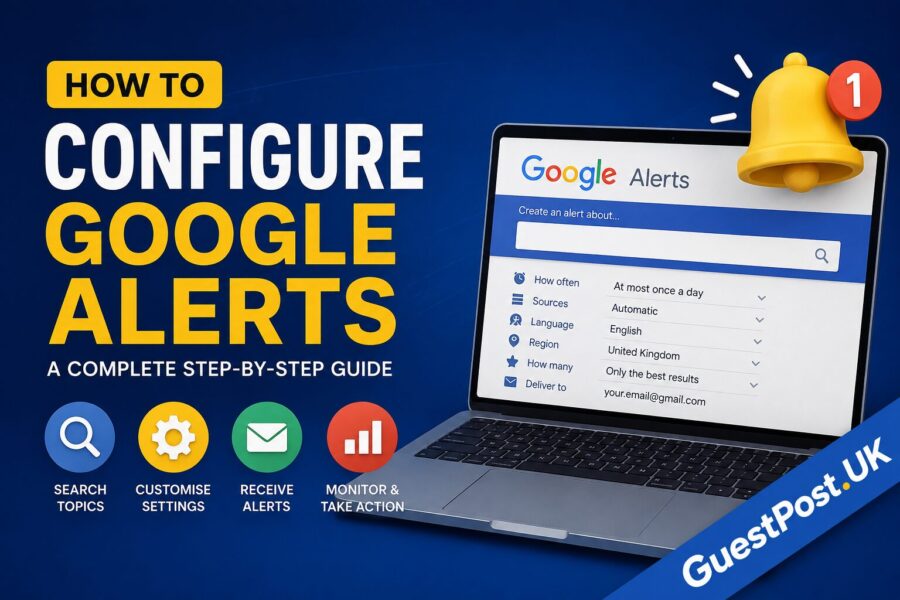
Google Alerts currently allows users to choose how often notifications arrive, which sources to monitor, the language and region, the volume of results and the delivery destination. Available source categories include automatic selection, news, blogs, web pages, videos, books, discussions and finance.
Google Alerts is not a complete media-monitoring or backlink-analysis platform. However, it remains useful for lightweight monitoring, particularly when you configure several precise alerts instead of one broad query.
How to Configure Google Alerts Step by Step
The basic setup takes only a few minutes.
1. Open Google Alerts
Visit the Google Alerts platform while signed in to the Google account that should receive the notifications.
The alerts you create will normally be associated with that account. This is important for agencies and businesses because notifications should ideally go to an inbox monitored by the relevant marketing or communications team.
2. Enter Your Search Query
Type the topic, company, phrase or keyword you want to monitor into the alert box.
For example:
GuestPost.UK
Google will display a preview of the type of results the alert may produce. Review this preview before creating the alert. If the results are too broad, refine the query before proceeding.
3. Select “Show Options”
Open the advanced options before clicking Create Alert. These settings control the frequency, sources, geographical focus and quantity of notifications.
The available choices may include:
- How often
- Sources
- Language
- Region
- How many
- Deliver to
Google’s official help documentation also advises users to open Show options when checking or changing their alert settings.
4. Choose How Often Alerts Arrive
The available frequency options are generally:
- As it happens
- At most once a day
- At most once a week
Choose the frequency based on how urgent the topic is.
As it happens is suitable for reputation risks, crisis monitoring, important brand names and time-sensitive PR opportunities. It may become overwhelming for popular subjects.
At most once a day is the best default for most SEO, competitor and content monitoring.
At most once a week works for low-priority topics, long-term research and less active industries.
Avoid selecting immediate notifications for every query. A large number of broad, real-time alerts can quickly make the system difficult to manage.
5. Select the Sources
Google Alerts can monitor several types of content. You can leave the source set to Automatic, allowing Google to select what it considers relevant, or choose a specific category.
Typical options include:
- News
- Blogs
- Web
- Video
- Books
- Discussions
- Finance
For brand monitoring, Automatic or Web is normally appropriate.
For industry announcements, select News.
For content and guest-post prospecting, Blogs and Web are often the most useful.
For monitoring tutorials, interviews and video reviews, create a separate alert using Video.
Using multiple alerts for the same core subject but different sources can produce cleaner results than forcing every source into one alert.
6. Choose the Language and Region
Set the language to match the content you want to find. A UK business may select English, but an international campaign could require separate alerts in German, French, Dutch or another target language.
The region setting helps Google prioritise results associated with a particular country.
For example, a UK SEO agency monitoring local developments should consider:
- Language: English
- Region: United Kingdom
A business operating across the UK and Belgium may benefit from separate alerts for each market rather than combining them.
7. Choose How Many Results to Receive
Google commonly provides two result-volume options:
- Only the best results
- All results
Only the best results is preferable for broad or high-volume topics. It reduces noise but may omit smaller mentions.
All results is more appropriate for an exact brand name, executive name, distinctive product or low-volume phrase where comprehensive monitoring is important.
For link reclamation, reputation management and brand monitoring, start with All results. If the notifications become noisy, change the setting or refine the query.
8. Select the Delivery Method
Alerts can usually be delivered to the email address connected to your Google account. Depending on the setup, RSS may also be available.
Email is simpler for most users. RSS is useful for agencies, researchers and marketing teams that want to consolidate alerts inside a feed reader or workflow system.
9. Create the Alert
Click Create Alert after reviewing the preview and settings.
Your new alert will appear under the My Alerts section. Repeat the process for each topic, brand or competitor you want to track.
How to Configure Google Alerts With Search Operators
The quality of an alert largely depends on the query. Broad phrases produce broad results, while precise operators help remove irrelevant mentions.
Google officially supports quotation marks for exact phrases, the minus sign for excluding terms and site: for limiting results to a particular website or domain.
Use Quotation Marks for Exact Phrases
Quotation marks tell Google to look for a specific phrase rather than pages containing the words separately.
Broad alert:
guest post uk
Exact-match alert:
"GuestPost.UK"
The second version is more appropriate for monitoring a distinctive brand name.
You can also monitor a person, product or campaign:
"John Smith SEO"
"Product Name"
"Marketing Campaign Name"
Exclude Irrelevant Words
Place a minus sign directly before a word you want to exclude.
For example:
"Google Alerts" -jobs
This can reduce job listings when you only want articles and discussions.
A brand with an ambiguous name may need several exclusions:
"Apple" -fruit -recipe -nutrition
Exclusion operators are helpful, but they are not always perfectly strict. Review the preview and adjust the query according to the results you actually receive.
Monitor Mentions Outside Your Own Website
To find third-party mentions of your brand, exclude your own domain:
"GuestPost.UK" -site:guestpost.uk
This is one of the most valuable Google Alerts configurations for SEO. It can reveal:
- Unlinked brand mentions
- Reviews
- Citations
- Republished content
- Forum discussions
- Partnership references
- Potential link-reclamation opportunities
Google documents the use of -site: to exclude results from a specific website.
Monitor a Specific Website
The site: operator can also restrict monitoring to one domain:
site:competitor.com "link building"
This may help identify when a competitor publishes new content around a particular service or subject.
However, Google Alerts should not be treated as a guaranteed crawler of every new competitor page. Combine it with manual competitor reviews and an SEO platform when comprehensive monitoring is required.
Combine a Brand With a Topic
A useful competitor alert combines the company name with a product, service or subject:
"Competitor Brand" "guest posting"
"Competitor Brand" pricing
"Competitor Brand" review
These alerts are more actionable than monitoring the company name alone.
Practical Google Alerts Examples for SEO
A strong setup normally includes several small, focused alerts.
Brand Mention Monitoring
Create alerts for the exact company name, common spelling variations and key products.
Examples:
"GuestPost.UK"
"Guest Post UK"
"GuestPost UK" -site:guestpost.uk
The version excluding your own domain is particularly useful for finding external references.
When an external mention does not include a link, contact the publisher politely and ask whether the brand reference can be linked to the most relevant page. This is known as unlinked mention reclamation.
Competitor Monitoring
Set up alerts for your leading search and commercial competitors.
Examples:
"Competitor Name"
"Competitor Name" launches
"Competitor Name" partnership
"Competitor Name" review
Monitor meaningful developments rather than every mention. A competitor’s new service page, acquisition, study or partnership may influence your content and positioning, whereas a routine social reference may not require action.
For deeper competitive research, combine alerts with a structured keyword gap analysis to identify queries for which competing websites have visibility, but your site does not.
Link-Building Opportunities
Google Alerts can surface newly published content related to your target topics.
Examples:
"write for us" SEO
"guest post" digital marketing
"contribute an article" SaaS
"become a contributor" business
These queries may identify publisher contribution pages, but they can also produce low-quality or outdated opportunities. Evaluate each website for relevance, real traffic, editorial standards and outbound-link quality before submitting content.
For a managed approach, consider professional link-building services rather than evaluating every prospect manually.
Digital PR and Journalist Research
Monitor phrases associated with commentary, research and expert contributions:
"looking for experts" SEO
"seeking comment" marketing
"industry survey" ecommerce
"new research" link building
Google Alerts is not a replacement for journalist-request platforms, but it may uncover articles, studies and discussions that create natural outreach opportunities.
Reputation Management
Create immediate alerts for combinations that may indicate dissatisfaction or reputational risk:
"Brand Name" complaint
"Brand Name" scam
"Brand Name" refund
"Brand Name" review
Not every negative mention requires a public response. First verify whether the result is genuine, current and visible to your audience. Then decide whether to respond, request a correction or resolve the underlying issue privately.
Businesses managing recurring reputational concerns may need a broader SEO reputation management strategy covering search results, reviews, brand assets and authoritative content.
Content Research
Monitor recurring questions and developments within your specialist topics:
"Google algorithm update"
"AI search optimisation"
"link building study"
"local SEO statistics"
Save useful sources in a research database and tag them by topic. This creates a steady stream of evidence, examples and news that can support future content.
Google Alerts for Guest Posting and Outreach
Google Alerts is particularly useful for finding timely outreach angles.
Suppose a publisher has just released a report about SaaS marketing. Instead of sending a generic guest-post pitch, you could offer a complementary article examining how SaaS companies build authority through digital PR and editorial links.
The workflow would be:
- Receive an alert for a relevant new article.
- Evaluate the publisher’s audience and editorial quality.
- Identify a topic gap related to the new article.
- Develop a specific contribution idea.
- Contact the editor with a concise, personalised pitch.
- Link the proposed article to the publisher’s existing coverage.
This is more effective than scraping thousands of generic “write for us” pages. Timeliness and topical relevance give the pitch a legitimate editorial reason.
How to Edit, Pause or Delete Google Alerts
Your monitoring requirements will change over time.
To edit an alert:
- Open Google Alerts.
- Find the alert under My Alerts.
- Select the edit or pencil icon.
- Change the query or options.
- Save the changes.
To delete an alert, select the bin icon beside it.
When an alert stops producing useful results, refine or delete it rather than allowing low-value notifications to accumulate. Google’s help guidance also recommends checking whether alerts have been disabled and reviewing the associated settings when results stop arriving.
Why Google Alerts May Not Be Working
The Query Is Too Narrow
An alert using several exact phrases and exclusions may produce no results.
Start with the core exact phrase, inspect the preview and add filters gradually.
The Topic Has Little New Coverage
Google Alerts looks for newly discovered content. A low-volume subject may simply have no new qualifying results.
Change the frequency to weekly and allow more time before deciding that the alert is broken.
Emails Are Being Filtered
Check spam, promotions, updates and automated folders. Search the inbox for messages from Google Alerts.
Create an inbox rule or label to keep alert emails organised.
The Results Are Too Broad
A query such as:
SEO
is unlikely to be useful. It may generate an excessive volume of unrelated content.
Use a precise phrase:
"technical SEO audit"
Or combine the topic with a use case:
"technical SEO audit" ecommerce
Google Has Not Indexed the Mention
Google Alerts depends on Google discovering and processing the page. Content that is blocked, poorly indexed, behind a login or published on a low-visibility website may not appear.
This is one reason Google Alerts should not be used as your only brand-monitoring or backlink-discovery system.
Advantages and Limitations of Google Alerts
Advantages
Google Alerts is:
- Free to use
- Quick to configure
- Suitable for beginners
- Useful for exact brand monitoring
- Helpful for lightweight competitor research
- Capable of supporting link reclamation
- Flexible enough for email or RSS workflows
- Easy to refine with search operators
Limitations
Google Alerts may:
- Miss some newly published pages
- Surface old or duplicated content
- Produce inconsistent results
- Provide limited filtering and collaboration
- Lack sentiment analysis
- Offer no reliable backlink verification
- Provide limited reporting and historical analysis
- Become noisy for broad subjects
The service is best treated as an early-warning tool, not a comprehensive web-monitoring database.
Google Alerts vs SEO and Media-Monitoring Tools
Google Alerts vs Semrush
Google Alerts is suitable for simple mention discovery. Semrush offers broader competitive research, keyword tracking, backlink analysis and SEO reporting.
Use Google Alerts for free ongoing notifications. Use Semrush when you need structured domain, keyword and competitor data.
Google Alerts vs Ahrefs
Ahrefs is more appropriate for backlink discovery, lost-link monitoring and competitor link analysis. Google Alerts may identify a mention before it appears in a backlink database, but it cannot reliably confirm link attributes or authority.
Use both when link building is important: Google Alerts for mention discovery and Ahrefs for link verification and competitive analysis.
Google Alerts vs Brand24 or Mention
Dedicated media-monitoring tools generally provide wider source coverage, dashboards, sentiment analysis, collaboration and reporting. They are better suited to established brands, PR teams and reputation-sensitive organisations.
Google Alerts remains attractive for small businesses and individual consultants because it has no subscription cost.
Textual Trend Comparison
Imagine a graph where the horizontal axis represents monitoring complexity and the vertical axis represents cost.
Google Alerts begins at the lower-left corner: minimal cost and relatively low complexity. Dedicated SEO platforms move towards the centre because they add ranking, backlink and competitive data at a moderate to high subscription cost. Enterprise media-monitoring tools sit towards the upper-right because they offer broader coverage, sentiment analysis, workflow management and advanced reporting.
The trend is not that higher cost automatically produces better results. The value increases only when a business needs the additional data and has the resources to act on it.
A Practical Google Alerts Setup for an SEO Business
A focused SEO business might create the following alert portfolio:
Brand alerts
"Brand Name"
"Brand Name" -site:branddomain.com
"Founder Name" "Brand Name"
Competitor alerts
"Competitor One"
"Competitor Two" pricing
"Competitor Three" partnership
Service alerts
"guest posting services"
"link building study"
"SEO audit checklist"
Opportunity alerts
"write for us" marketing
"seeking SEO expert"
"looking for contributors" business
Reputation alerts
"Brand Name" review
"Brand Name" complaint
"Brand Name" scam
Review the output monthly. Remove alerts producing no useful information, add exclusions to noisy queries and create new alerts around emerging priorities.
Final Verdict: How Should You Configure Google Alerts?
For most businesses, the best approach is to create several exact, purpose-specific alerts rather than one broad alert.
Prioritise:
- Exact brand-name alerts
- External mentions excluding your own domain
- Three to five important competitor alerts
- High-value industry and service phrases
- Reputation-related brand combinations
- Select outreach and guest-post opportunity queries
Beginners can rely on Google Alerts for free brand and topic monitoring. SEO agencies should combine it with rank tracking, backlink analysis and client reporting platforms. Advanced PR and reputation teams should consider dedicated media-monitoring software when they require wider coverage, sentiment analysis and collaborative workflows.
Google Alerts delivers the most value when every alert has an intended action. A brand mention may trigger link reclamation. A competitor article may inspire a content-gap review. A journalist request may create a digital PR opportunity. Without that action layer, notifications simply become more email.
Frequently Asked Questions About Configuring Google Alerts
How do I configure Google Alerts?
Open Google Alerts, enter a search query, select Show options, choose the frequency, source, language, region, result volume and delivery method, then select Create Alert.
Is Google Alerts free?
Yes. Google Alerts is available without a separate paid subscription.
Can I use Google Alerts without Gmail?
Alerts are connected to a Google account, but a Google account can be created using certain non-Gmail email addresses. Available delivery options should be confirmed within the alert settings associated with your account.
How many Google Alerts can I create?
Google does not prominently publish a simple universal limit within the main Alerts interface. Create only the alerts you can review and act upon rather than generating hundreds of low-value notifications.
Can Google Alerts monitor social media?
Coverage of social networks is inconsistent and limited. Use a dedicated social-listening or media-monitoring platform when comprehensive social monitoring is required.
Can Google Alerts find backlinks?
It can reveal pages mentioning your brand or target phrase, some of which may contain backlinks. However, it is not a backlink index and cannot reliably report every new or lost link.
How can I find unlinked brand mentions?
Create an exact-match brand alert and exclude your website:
"Brand Name" -site:branddomain.com
Review each external result and check whether it links to your website.
How often should Google Alerts be sent?
Daily notifications are suitable for most marketing and SEO queries. Use immediate alerts for urgent reputation topics and weekly alerts for low-priority research.
Why am I receiving irrelevant alerts?
The query may be too broad. Add quotation marks around exact phrases, exclude unwanted terms with a minus sign and separate different monitoring objectives into individual alerts.
Is Google Alerts reliable enough for reputation management?
It is useful as a free supporting tool but should not be the only monitoring system for a high-profile or reputation-sensitive organisation. Dedicated platforms usually provide broader coverage, faster analysis and better reporting.