Google Search Console contains a wealth of useful data, but the default query table can become messy quickly. Brand searches, irrelevant terms, product names, blog traffic and location queries are all mixed together. Regex filters give you a way to separate those patterns without exporting data to a spreadsheet first.
A regex is simply a search pattern. In Search Console, it can match or exclude several queries or URLs at the same time. Once you know a handful of simple expressions, you can turn a broad performance report into a much more useful SEO analysis.
If you are already using Search Console for an SEO audit, regex filtering helps you move from “traffic went up or down” to understanding which part of your organic visibility changed.
Where to use regex in Search Console
Open the Performance report, click + Add filter, choose either Queries or Pages, then select Custom (regex).
Google uses RE2 syntax for these filters. The important point is that Search Console uses a partial match by default. In other words, a pattern can match anywhere in a query or URL unless you tell it otherwise.
For example:
seocan match “seo audit”, “local seo services” and “best seo tools”^seomatches only queries beginning with “seo”seo$matches only queries ending with “seo”^seo$matches the exact query “seo”
This makes the start symbol ^ and end symbol $ especially useful when you want precise reporting.
Separate branded and non-branded traffic
One of the best uses of regex is separating people who already know your brand from those discovering you through broader searches.
For GuestPost.UK, a basic branded regex could look like this:
guestpost\.uk|guest post uk|guestpostuk
Use Matches regex to see likely brand-related searches. Then choose Doesn’t match regex to create a non-branded view.
Be careful with brand variations. Searchers may use spaces, abbreviations, spelling variations or attach a service name to the brand. Check your actual query list before finalising the expression.
This reporting split matters because branded clicks and non-branded clicks answer different questions:
- Branded growth can indicate stronger awareness, referral visibility or returning demand
- Non-branded growth usually shows whether your content is reaching new audiences
- A fall in one does not automatically mean a fall in the other
You can use this filter alongside a date comparison to see whether a campaign improved discovery or merely increased demand from existing followers.
Analyse a group of related keywords
Regex is ideal when one topic is represented by several related phrases.
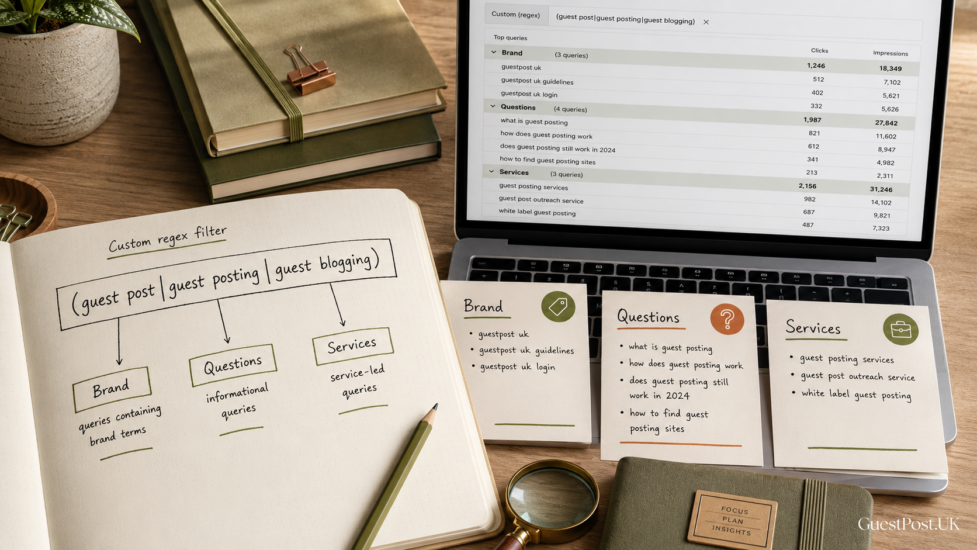
Suppose you want to measure your visibility around guest posting. Instead of filtering every term one by one, try:
guest post|guest posting|guest blogging
The vertical bar | means “or”. Search Console’s own documentation recommends placing multiple options inside brackets when you need to group them:
(guest post|guest posting|guest blogging)
This lets you review clicks, impressions, CTR, and average position for a topic cluster in a single view.
You can use the same approach for service categories:
(seo audit|website audit|technical seo audit)
Or location-led searches:
(london|manchester|birmingham).*(seo|link building)
The second example is more advanced. It looks for a selected city followed somewhere later by “seo” or “link building”. Test expressions gradually. Start with a simpler query group, check the matches, then refine it.
Find question-led content opportunities
Question queries are useful for identifying blog topics, missing FAQ sections and pages that could answer a user’s next question more clearly.
Try filtering queries with:
^(how|what|why|when|where|who)\b
This is designed to find searches beginning with common question words. Review the results for:
- High impressions but weak CTR
- Queries ranking on page two
- Questions sending traffic to a page that does not answer them well
- Repeated question themes that deserve a dedicated guide
A page that ranks for “what is niche relevance in link building” may need a clearer definition near the top. If several question variations appear but none has a strong landing page, that may justify a new article.
This is a more useful way to plan content than publishing broad topics just because competitors have written about them. Use genuine audience demand first, then support the new article with relevant internal links.
Filter pages by a website section
Regex also works for URLs, making it easier to measure a part of your site without relying on a single folder filter.
For example:
/blog/
will find URLs containing that section. If your URL structure has several blog patterns, group them:
(/blog/|/category/seo/)
You can also filter a group of service pages:
/(seo-services|link-building-services|guest-posting-services)/
This is helpful when comparing whether commercial pages and educational content are moving in different directions. Apply a date comparison and look at clicks, impressions and CTR together. A drop in clicks may be caused by lower impressions, a weaker click-through rate or seasonal demand—not necessarily a ranking issue.
Five regex patterns worth saving
| Goal | Regex filter |
|---|---|
| Find exact query | ^guest posting$ |
| Match several phrases | `(guest post |
| Queries starting with a word | ^best |
| Queries ending with a word | services$ |
| Exclude a word pattern | Use “Doesn’t match regex” with `free |
The period is a special regex character, so use a backslash when matching a literal domain name. For example, use guestpost\.uk, not guestpost.uk, if you want the dot treated as a real full stop.
Avoid misleading conclusions
Regex filters are powerful, but Search Console data has limits. Google notes that filtering by query or URL can affect report totals because some queries are anonymised and data can be truncated. This means your filtered numbers may not add up neatly to the unfiltered total.
Treat regex as a way to investigate patterns, not as a perfect accounting system.
Also remember that a broad expression may catch unwanted terms. A pattern such as link could include “linkedin”, “linking”, “linktree” and unrelated searches. Always scan the actual matching queries before reporting a result to a client or making a content decision.
Build better reports from the data you already own
You do not need expensive reporting software to uncover useful opportunities. A few well-built regex filters can show which services attract commercial searches, which blog themes drive new readers and which branded terms reflect growing awareness.
Save your most useful filters in a shared document, then review them monthly against previous periods. Combine the findings with high-quality link-building services and content improvements, rather than treating a single filter as an SEO strategy in itself.
The value of Search Console is not in collecting more data. It is in asking better questions of the data you already have.