Artificial intelligence has rapidly evolved from a simple writing assistant into a powerful business productivity tool. While platforms such as ChatGPT, Claude and Google Gemini excel at generating content and answering questions, businesses are increasingly looking for something more practical—AI that can actually perform work rather than simply talk about it.
This is where Zapier AI comes into the picture.
Zapier has long been recognised as one of the world’s leading workflow automation platforms, helping businesses connect thousands of applications without writing code. With the introduction of AI-powered features, the company has taken automation a step further by enabling users to build intelligent workflows using natural language rather than manually configuring each step.
Rather than asking:
“How do I automate my lead generation process?”
You can now describe what you want, and Zapier AI helps build much of the workflow for you.
That shift makes automation significantly more accessible for marketers, SEO professionals, agencies and business owners who previously found workflow builders too technical or time-consuming.
But is Zapier AI genuinely worth using, or is it simply another AI feature added to an already popular platform?
In this comprehensive Zapier AI review, we’ll examine its features, pricing, practical use cases, strengths, weaknesses and real-world applications. We’ll also compare it with ChatGPT, Make, Microsoft Power Automate and n8n to help you decide whether it’s the right automation platform for your business.
Whether you’re an SEO consultant, agency owner, freelancer or SaaS marketer, this guide will help you understand where Zapier AI fits into a modern digital marketing workflow.
What Is Zapier AI?
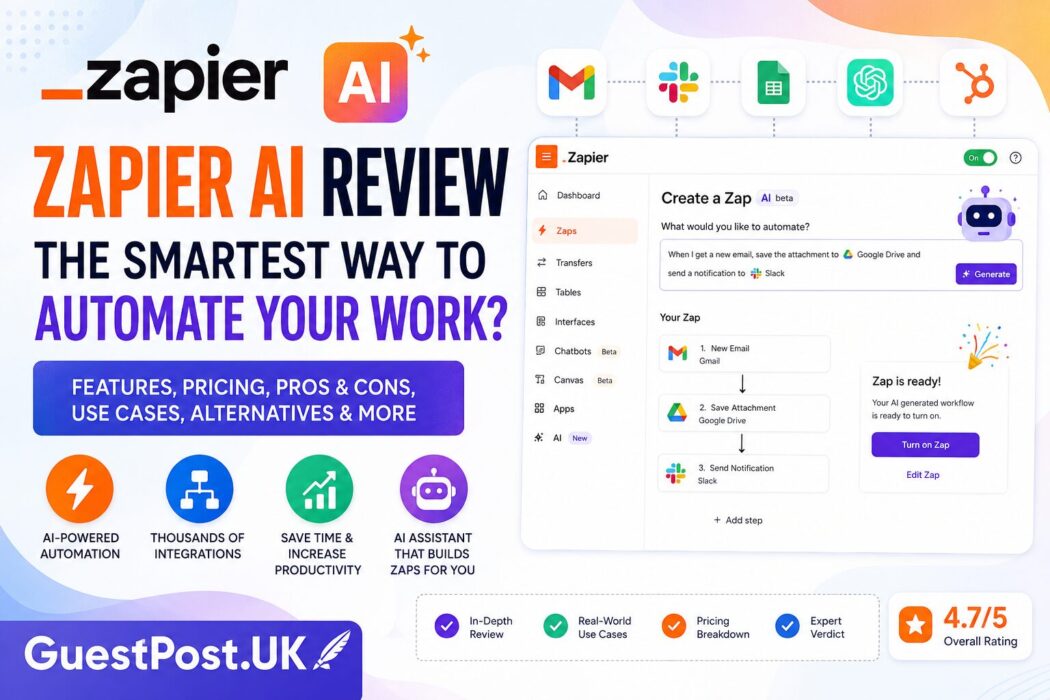
Zapier AI is a collection of artificial intelligence features integrated into the Zapier automation platform.
Its primary purpose is to simplify workflow creation by allowing users to describe automations in plain English rather than manually configuring every trigger, action, and condition.
Traditionally, creating an automation involved selecting applications, defining triggers, mapping fields and testing the workflow before deployment.
Zapier AI reduces much of this manual setup.
For example, instead of spending several minutes building an automation, you might simply type:
“When someone submits my website contact form, save the details to Google Sheets, notify my sales team in Slack and send a personalised follow-up email.”
Zapier AI can interpret that request and automatically generate much of the workflow.
This dramatically lowers the barrier to entry for businesses that want to automate repetitive processes without hiring developers.
What Makes Zapier AI Different?
The original Zapier platform focused on connecting applications through predefined automation rules.
For example:
If this happens…
↓
Do this action.
While powerful, building complex workflows often requires careful planning and a reasonable understanding of how automation platforms work.
Zapier AI introduces a more conversational approach.
Instead of thinking in terms of triggers and actions, users describe business outcomes.
For example:
“Whenever a new customer completes a purchase, create a task for the onboarding team, send a welcome email and notify customer support.”
The AI then converts that request into an executable workflow.
This significantly reduces setup time while making automation accessible to non-technical users.
A Brief History of Zapier
Founded in 2011, Zapier quickly became one of the most recognised names in workflow automation.
Its original mission was straightforward:
Help businesses connect software applications without writing code.
Over the years, the platform has expanded dramatically.
Today, it supports integration with thousands of popular services, including:
- Gmail
- Microsoft Outlook
- Slack
- Google Workspace
- Trello
- Notion
- Shopify
- HubSpot
- Salesforce
- WordPress
- Airtable
- Mailchimp
- Zoom
- Asana
- Stripe
This extensive integration ecosystem is one of Zapier’s greatest strengths.
Rather than replacing existing software, Zapier connects it.
The addition of AI builds upon that philosophy by making automation easier to create and manage.
Why AI Automation Matters
Businesses now use more software than ever before.
A typical marketing team may rely on:
- CRM software
- Email marketing platforms
- SEO tools
- Project management systems
- Analytics dashboards
- Help desk software
- Content management systems
- Social media scheduling tools
Each application stores valuable information.
The challenge is ensuring that information moves efficiently between systems.
Without automation, employees often spend hours every week:
- Copying information.
- Updating spreadsheets.
- Sending notifications.
- Creating tasks.
- Following up with customers.
- Producing reports.
These activities are repetitive and prone to human error.
Automation removes much of this manual work.
Artificial intelligence makes that automation significantly smarter.
Instead of following rigid instructions, AI can:
- Interpret requests.
- Summarise information.
- Generate responses.
- Categorise data.
- Make contextual decisions.
- Assist with workflow creation.
This combination of automation and AI is precisely what Zapier is investing in.
How Zapier AI Works
Zapier AI sits alongside the platform’s existing automation engine rather than replacing it.
Users can still create workflows manually if they prefer.
However, AI introduces several new capabilities.
Natural Language Workflow Creation
Perhaps the biggest improvement is the ability to describe automations using everyday language.
For example:
“Whenever someone books a consultation through Calendly, add them to HubSpot, notify the sales manager and create a follow-up reminder.”
Rather than configuring each step individually, Zapier AI automatically generates the workflow.
Users can then review, edit and refine the automation before enabling it.
AI-Assisted Workflow Suggestions
The platform can also recommend improvements based on your automation goals.
Examples include:
- Adding filters.
- Improving data mapping.
- Suggesting additional actions.
- Identifying missing workflow steps.
These recommendations reduce the likelihood of incomplete or inefficient automations.
AI Chatbots
Zapier has expanded beyond traditional workflow automation by introducing AI-powered chatbots.
Businesses can create conversational assistants capable of:
- Answering customer questions.
- Collecting leads.
- Retrieving information.
- Triggering automated workflows.
- Escalating enquiries when necessary.
This creates opportunities for businesses to automate customer interactions while maintaining consistent service.
AI Actions
Another important capability is allowing AI to interact directly with connected applications.
Instead of simply generating content, AI can trigger real actions such as:
- Sending emails.
- Updating databases.
- Creating CRM records.
- Scheduling meetings.
- Managing support tickets.
This transforms AI from an information provider into an active participant within business processes.
Key Features of Zapier AI
Zapier AI isn’t just one feature.
It’s a growing collection of AI-powered capabilities designed to simplify automation.
Some of the most important include:
AI Workflow Builder
Describe your automation in plain English.
Zapier AI generates the workflow.
AI-Powered Chatbots
Create customer-facing AI assistants that can interact with visitors and initiate business processes.
Thousands of App Integrations
Zapier connects with more than 7,000 applications, making it one of the largest automation ecosystems available.
Whether you’re working with marketing tools, CRMs, e-commerce platforms or productivity software, there’s a strong chance Zapier already supports them.
Multi-Step Workflows
Simple automations are useful.
Complex business processes are where Zapier truly excels.
One workflow might include:
Customer enquiry
↓
AI categorises the request
↓
Create CRM contact
↓
Assign a sales representative
↓
Send a personalised email
↓
Notify Slack channel
↓
Schedule follow-up task
All without requiring manual intervention.
Conditional Logic
Not every customer should follow the same journey.
Zapier allows workflows to include:
- Filters.
- Conditions.
- Branching logic.
- Delays.
- Formatting.
- Data transformations.
Combined with AI, these workflows become significantly more intelligent.
Why SEO Professionals Should Care
Although Zapier isn’t an SEO tool in the traditional sense, it has enormous potential for improving SEO operations.
Consider the number of repetitive tasks involved in running a typical SEO campaign:
- Creating client reports.
- Monitoring rankings.
- Tracking backlinks.
- Publishing blog content.
- Organising outreach.
- Managing editorial calendars.
- Updating spreadsheets.
- Following up with prospects.
Many of these activities involve moving information between different platforms.
Zapier AI helps reduce that administrative burden.
Instead of manually updating systems, businesses can automate routine processes and let AI assist with decision-making and workflow creation.
For agencies managing multiple clients, those time savings can quickly become substantial.
Practical SEO Use Cases for Zapier AI
The true strength of Zapier AI isn’t simply that it can automate tasks—it’s that it can automate complete business processes involving multiple applications.
For SEO professionals, this can dramatically reduce repetitive administration while improving consistency across campaigns.
Let’s explore where Zapier AI can make the biggest impact.
Automated SEO Reporting
Every SEO agency understands the time required to produce monthly reports.
Typically, the process looks something like this:
- Export ranking data.
- Retrieve analytics.
- Collect backlink information.
- Update spreadsheets.
- Create summaries.
- Email clients.
These tasks may take only 30–60 minutes per client, but multiply that by 20 or 30 clients, and the workload quickly becomes substantial.
Using Zapier AI, much of this process can be automated.
A workflow could:
- Retrieve performance data from multiple platforms.
- Organise it into a reporting dashboard.
- Generate an executive summary using AI.
- Notify your team for review.
- Send the completed report to the client.
Instead of spending hours preparing reports, your team can focus on interpreting results and recommending improvements.
Content Publishing Workflows
Publishing a blog post often involves more than simply pressing the Publish button.
Many businesses also need to:
- Notify the marketing team.
- Update editorial spreadsheets.
- Share content on social media.
- Add the article to newsletters.
- Create internal tasks.
- Record publication dates.
Zapier AI allows these actions to occur automatically whenever new content goes live.
For content-heavy websites, this removes a considerable amount of repetitive administration.
Lead Generation Automation
SEO campaigns ultimately aim to generate enquiries.
When someone completes a contact form, several departments may need to take action.
Rather than manually processing every enquiry, Zapier AI can automatically:
- Create a CRM contact.
- Notify the sales team.
- Assign a sales representative.
- Send a personalised acknowledgement email.
- Schedule a follow-up reminder.
- Record the lead source.
The result is a faster response time and a more consistent customer experience.
Link Building Management
Link building involves a surprising amount of organisation.
A typical outreach campaign requires:
- Prospect research.
- Contact collection.
- Outreach emails.
- Follow-up reminders.
- Response tracking.
- Publication monitoring.
- Spreadsheet updates.
Although AI cannot build genuine relationships for you, it can automate many supporting administrative tasks.
For example:
Prospect approved
↓
Create outreach record
↓
Schedule a personalised email
↓
Wait five days
↓
Send a follow-up if no response
↓
Update CRM
↓
Notify the campaign manager
These small efficiencies become increasingly valuable when managing hundreds of outreach opportunities.
Internal SEO Task Management
Agencies frequently identify issues during audits.
Someone then needs to:
- Create tickets.
- Assign priorities.
- Notify developers.
- Track progress.
- Confirm completion.
Zapier AI can automate much of this project management.
When a technical issue is identified, the platform can automatically create tasks in systems such as Asana, Trello or ClickUp while notifying the appropriate team members.
Zapier AI for Marketing Teams
Although SEO is a natural fit, Zapier AI extends well beyond search marketing.
Marketing departments can automate:
- Newsletter sign-ups.
- Customer onboarding.
- Webinar registrations.
- Survey responses.
- Customer feedback.
- Product launches.
- CRM updates.
- Social media notifications.
Rather than creating isolated automations, businesses can connect entire customer journeys.
This creates more consistent marketing operations while reducing manual workload.
Zapier AI Pricing
Zapier offers several pricing tiers depending on automation requirements.
While the free plan allows users to explore the platform, many AI capabilities and advanced workflow features are available on paid plans.
When evaluating pricing, businesses should consider three factors:
Number of Automations
Larger organisations naturally require more workflows than individual users.
The number of tasks processed each month often determines which pricing tier offers the best value.
Workflow Complexity
Simple automations typically involve one trigger and one action.
Larger businesses may require:
- Multi-step workflows.
- Conditional logic.
- Data formatting.
- AI actions.
- Premium integrations.
These advanced capabilities are generally available on higher-tier plans.
Return on Investment
Rather than focusing purely on subscription cost, businesses should evaluate how much staff time automation saves.
For example:
If Zapier AI saves:
- 10 hours per month
- At an average staff cost of £30 per hour
The potential productivity gain exceeds £300 each month.
Viewed this way, automation often pays for itself surprisingly quickly.
Consultant Scorecard
After evaluating Zapier AI across a range of business scenarios, here’s our assessment.
| Category | Rating |
|---|---|
| Ease of Use | ⭐⭐⭐⭐⭐ |
| Workflow Automation | ⭐⭐⭐⭐⭐ |
| AI Features | ⭐⭐⭐⭐☆ |
| App Integrations | ⭐⭐⭐⭐⭐ |
| SEO Applications | ⭐⭐⭐⭐⭐ |
| Learning Curve | ⭐⭐⭐⭐☆ |
| Value for Money | ⭐⭐⭐⭐☆ |
| Overall Rating | ⭐⭐⭐⭐⭐ (4.8/5) |
Zapier remains one of the easiest automation platforms for beginners while still providing enough flexibility for experienced users.
Advantages of Zapier AI
Extremely Beginner Friendly
Many automation platforms require users to understand workflow logic before building useful automations.
Zapier AI significantly reduces this learning curve by allowing users to describe workflows in natural language.
This makes automation accessible to a much wider audience.
Massive Integration Library
One of Zapier’s greatest strengths is its ecosystem.
With thousands of supported applications, businesses rarely need to worry about software compatibility.
Whether you use:
- Google Workspace
- Microsoft 365
- HubSpot
- Salesforce
- Shopify
- WordPress
- Slack
- Notion
There’s a strong chance Zapier already supports it.
Rapid Workflow Creation
Building automations manually can take considerable time.
AI-assisted workflow generation reduces setup time and suggests improvements users may not have considered.
Excellent for Agencies
Digital agencies often repeat similar processes across multiple clients.
Once a workflow has been created, it can often be adapted for additional projects with only minor adjustments.
This creates consistency while improving operational efficiency.
Strong Community
Zapier has been established for many years.
As a result, users benefit from:
- Extensive documentation.
- Community tutorials.
- Video guides.
- Workflow templates.
- Third-party resources.
This ecosystem makes learning considerably easier than newer automation platforms.
Drawbacks of Zapier AI
Despite its strengths, Zapier AI isn’t perfect.
Premium Features Can Become Expensive
Businesses running thousands of automated tasks each month may find subscription costs increase as their automation requirements grow.
Careful workflow optimisation becomes increasingly important for larger organisations.
Complex Workflows Still Require Planning
Although AI simplifies setup, users still need to understand their business processes.
Poorly designed workflows can produce unexpected results regardless of how intelligent the AI becomes.
AI Isn’t Always Perfect
AI-generated workflows are often excellent starting points.
However, businesses should still review every automation carefully before relying on it in production environments.
Human oversight remains essential.
Some Technical Knowledge Still Helps
Although Zapier AI lowers the barrier to entry, understanding concepts such as triggers, actions, filters and conditional logic remains beneficial when building more sophisticated workflows.
Who Will Benefit Most?
Freelancers
Freelancers can automate repetitive administration while spending more time on client work.
Small Businesses
Businesses without dedicated IT teams can automate processes that previously required manual effort or expensive development resources.
SEO Agencies
Agencies managing multiple campaigns are among the biggest winners.
Automating recurring reports, task creation and lead management allows consultants to concentrate on strategy rather than administration.
Marketing Departments
Teams responsible for CRM management, campaigns, lead generation and customer communication can connect multiple platforms without writing code.
Growing Businesses
As organisations expand, administrative workload grows rapidly.
Automation helps scale operations without requiring proportional increases in staffing.
Is Zapier AI Worth the Investment?
For many businesses, the answer is yes.
The key reason is simple:
Automation compounds.
Saving five minutes on one task isn’t particularly impressive.
Saving five minutes across hundreds of recurring processes every week can completely transform operational efficiency.
Zapier AI doesn’t replace employees.
Instead, it removes repetitive administrative work so employees can focus on activities requiring creativity, judgement and expertise.
For SEO professionals, marketers and agencies, that’s where the platform delivers its greatest value.
Zapier AI vs ChatGPT
Although both platforms use artificial intelligence, they solve very different problems.
ChatGPT is primarily designed to help users think, write, analyse and solve problems through conversation.
Zapier AI, meanwhile, focuses on taking action by connecting applications and automating workflows.
Think of it this way:
ChatGPT helps you decide what to do.
↓
Zapier AI helps your software do it automatically.
For example:
Using ChatGPT, you might ask:
“Write a follow-up email for a new SEO lead.”
Using Zapier AI, you could automate the entire process:
- New lead enters CRM.
- AI drafts a personalised email.
- Email is reviewed or sent automatically.
- Sales team receives a Slack notification.
- Follow-up reminder is created.
- CRM status is updated.
The platforms complement one another rather than compete directly.
Feature Comparison
| Feature | Zapier AI | ChatGPT |
|---|---|---|
| Conversational AI | Good | ⭐⭐⭐⭐⭐ |
| Workflow Automation | ⭐⭐⭐⭐⭐ | Limited |
| AI Writing | Good | ⭐⭐⭐⭐⭐ |
| Coding Assistance | Good | ⭐⭐⭐⭐⭐ |
| Business Automation | ⭐⭐⭐⭐⭐ | Limited |
| App Integrations | ⭐⭐⭐⭐⭐ | Growing |
| SEO Research | Good | ⭐⭐⭐⭐⭐ |
| Best For | Automation | Research, writing and strategy |
Which One Is Better?
If your work mainly involves:
- Writing content
- Brainstorming
- Keyword research
- Coding
- Learning SEO
ChatGPT remains the stronger choice.
However, if your business relies on repetitive operational processes, Zapier AI offers capabilities that ChatGPT simply wasn’t designed to provide.
Most agencies will achieve the best results by using both together.
Zapier AI vs Make
One of Zapier’s biggest competitors is Make (formerly Integromat).
Both platforms specialise in workflow automation, but they take noticeably different approaches.
Ease of Use
Zapier has traditionally prioritised simplicity.
Most automations can be created quickly, even by users with little technical experience.
Make offers considerably greater flexibility, but require more planning.
Its visual workflow builder supports sophisticated branching logic and complex scenarios, though beginners often find it intimidating.
Workflow Complexity
For straightforward automations:
Zapier generally wins.
For advanced data processing involving dozens of conditions:
Make often provides greater control.
AI Capabilities
Zapier has invested heavily in integrating AI directly into workflow creation.
Instead of manually configuring every automation, users can describe what they want in plain English.
While Make also supports AI integrations, Zapier currently delivers a smoother AI-first experience for many users.
Which Is Better?
Choose Zapier if you want:
- Faster setup.
- Simpler automation.
- AI-assisted workflow creation.
- Minimal learning curve.
Choose Make if you require:
- Highly customised workflows.
- Advanced logic.
- Complex automation scenarios.
- Greater technical flexibility.
Zapier AI vs n8n
n8n has become increasingly popular among developers and technically experienced marketers.
Unlike Zapier, n8n is open source and offers significantly more control over workflow execution.
Flexibility
n8n provides exceptional flexibility.
Developers can customise workflows extensively and even self-host the platform.
Zapier, in contrast, focuses on convenience rather than maximum configurability.
Learning Curve
This is where Zapier has a significant advantage.
Most non-technical users become productive much more quickly.
n8n requires greater familiarity with automation concepts and API integrations.
AI Integration
Both platforms now support AI-powered workflows.
However, Zapier AI currently offers a more polished experience for users who want to build automations using natural language rather than technical configuration.
Best Choice
Choose n8n if:
- You have technical expertise.
- You want complete control.
- Self-hosting is important.
- You enjoy building advanced workflows.
Choose Zapier AI if:
- Speed matters.
- Ease of use is a priority.
- Your team includes non-technical staff.
- You want AI to simplify the creation of automation.
Zapier AI vs Microsoft Power Automate
Microsoft Power Automate is another major player in workflow automation.
It integrates particularly well with Microsoft products such as:
- Outlook
- Excel
- Teams
- SharePoint
- Dynamics 365
For businesses heavily invested in Microsoft’s ecosystem, Power Automate can be an attractive option.
However, Zapier generally offers:
- A larger integration library.
- Faster setup.
- Simpler workflows.
- Better support for non-Microsoft applications.
For organisations using Google Workspace, WordPress, HubSpot and hundreds of SaaS platforms, Zapier often provides greater flexibility.
Best Zapier AI Alternatives
If Zapier AI isn’t the perfect fit, several alternatives deserve consideration.
| Tool | Best For |
|---|---|
| ChatGPT | Content creation, research and strategy |
| Make | Advanced workflow automation |
| n8n | Technical users and developers |
| Microsoft Power Automate | Microsoft-based organisations |
| Claude | Long-form writing and document analysis |
| Google Gemini | Google Workspace users |
| Letaido | AI-powered marketing workflows |
| IFTTT | Simple personal automations |
Each platform has its strengths.
Rather than asking which tool is objectively best, it’s more useful to ask which platform best matches your business processes.
Graph-Style View of Automation Trends
The evolution of business automation has accelerated dramatically over the past decade.
Think of the progression like this:
2015
Simple automation
↓
“If this happens…”
↓
“Do this.”
2018
Multi-step workflows
↓
Conditional logic
↓
Application integrations
↓
Business process automation
2022
Cloud-based workflow ecosystems
↓
Thousands of connected applications
↓
Cross-platform collaboration
2024
AI-assisted automation
↓
Natural language workflow creation
↓
AI-generated suggestions
↓
Smart decision support
2026 and Beyond
AI agents
↓
Self-improving workflows
↓
Context-aware automation
↓
Autonomous business operations
This progression illustrates an important trend.
Businesses are moving beyond simple automation rules towards intelligent systems capable of understanding objectives and adapting accordingly.
Zapier AI represents one of the clearest examples of this shift.
Best Platform for Different Users
Choosing the right automation platform depends on your experience level and business requirements.
Beginners
Recommended:
- Zapier AI
- ChatGPT
These platforms prioritise ease of use while offering powerful functionality.
Freelancers
Recommended stack:
- ChatGPT
- Zapier AI
This combination covers writing, research and business automation without unnecessary complexity.
SEO Agencies
Recommended stack:
- Zapier AI
- ChatGPT
- Ahrefs
Together, these platforms provide:
- SEO research.
- AI-assisted content.
- Workflow automation.
- Client reporting.
- Operational efficiency.
Growing Businesses
Recommended:
- Zapier AI
- CRM platform
- Marketing software
- Project management system
Automation becomes increasingly valuable as organisations scale.
Enterprise Organisations
Recommended:
- Zapier AI
- Microsoft Power Automate (where applicable)
- Business intelligence tools
- Existing CRM ecosystem
Large businesses typically benefit most from connecting multiple departments through automated workflows.
Where Zapier AI Could Improve
Despite being a market leader, there are still opportunities for improvement.
More Transparent AI Recommendations
When AI generates workflows, it would be helpful if the platform explained why certain actions were recommended.
Greater transparency would help users better understand and refine automations.
Better Workflow Visualisation
Complex automations can become difficult to interpret.
Additional visual reporting and dependency mapping would make large workflows easier to maintain.
Improved AI Optimisation Suggestions
Beyond creating workflows, Zapier AI could eventually recommend performance improvements based on workflow history.
For example:
- Reducing unnecessary steps.
- Improving execution speed.
- Identifying bottlenecks.
- Suggesting more efficient integrations.
Enhanced Industry Templates
Although Zapier already offers numerous templates, expanding industry-specific automation libraries would help new users become productive even faster.
Templates tailored for:
- SEO agencies.
- E-commerce businesses.
- Healthcare.
- Recruitment.
- Property.
- Finance.
would reduce implementation time considerably.
SEO Consultant’s Perspective
After evaluating Zapier AI from an SEO consultant’s viewpoint, one conclusion stands out.
The platform isn’t designed to improve rankings directly.
Instead, it improves how SEO teams operate.
That distinction matters.
Modern SEO involves managing increasingly complex workflows across multiple platforms.
Reporting, content production, outreach, lead management and project coordination all consume valuable time.
Zapier AI reduces that operational friction.
Rather than replacing specialist SEO software, it connects those tools into a more efficient ecosystem.
For agencies managing multiple clients, that operational efficiency can become a genuine competitive advantage.
Final Verdict: Is Zapier AI Worth It?
Zapier has been one of the most trusted names in workflow automation for well over a decade. With the introduction of AI-powered features, it hasn’t tried to reinvent the platform—instead, it has made automation more accessible, faster to build and easier for non-technical users to adopt.
That is arguably its greatest achievement.
Rather than expecting users to understand complex triggers, actions and conditional logic from the outset, Zapier AI allows them to describe what they want in plain English. The platform then translates those ideas into working automations that can be refined and expanded over time.
For SEO professionals, digital marketers and agencies, this can remove hours of repetitive administrative work every month.
Whether you’re automating client reporting, content publishing, lead management or internal task creation, Zapier AI helps streamline the operational side of digital marketing so you can focus on strategy and growth.
While it isn’t the cheapest automation platform on the market, its ease of use, extensive integrations, and growing AI capabilities make it one of the strongest options for businesses that want to automate without hiring developers.
Who Should Use Zapier AI?
Zapier AI is particularly well suited to organisations that rely on multiple cloud applications and repetitive business processes.
SEO Agencies
SEO agencies often manage dozens of recurring tasks across multiple client accounts.
Zapier AI can help automate:
- Monthly SEO reporting
- Lead management
- Client onboarding
- Content publishing notifications
- Outreach workflows
- Internal project management
- CRM updates
For growing agencies, these efficiencies can quickly translate into significant time savings.
Digital Marketing Agencies
Marketing teams handling PPC, SEO, social media and email campaigns can use Zapier AI to connect platforms and eliminate repetitive manual work.
Examples include:
- Automatically assigning new leads
- Triggering email campaigns
- Updating customer records
- Creating marketing tasks
- Synchronising campaign data
Freelancers
Freelancers often wear multiple hats.
Automating routine administrative tasks frees up time for billable client work and business development.
Small Businesses
Business owners without technical teams can use Zapier AI to automate everyday operations without needing to learn to code.
This makes sophisticated automation accessible to organisations of almost any size.
Who Might Not Need Zapier AI?
Although Zapier AI is an excellent platform, it isn’t essential for everyone.
You may not need it if:
- You rarely repeat business processes.
- Your work involves very few software applications.
- You only manage one small website.
- Your automation requirements are minimal.
- You’re primarily looking for an AI writing assistant.
In these situations, conversational AI tools such as ChatGPT or Claude may provide greater day-to-day value.
Best Tools for Different Types of Users
Every business has different priorities.
The following recommendations reflect where each platform performs best.
| User Type | Recommended Platform |
|---|---|
| Beginners | Zapier AI |
| Content Writers | ChatGPT |
| Freelancers | ChatGPT + Zapier AI |
| SEO Consultants | Ahrefs + ChatGPT + Zapier AI |
| Digital Agencies | Zapier AI + CRM + SEO tools |
| Enterprise Teams | Zapier AI + Microsoft Power Automate (where applicable) |
Rather than replacing existing software, Zapier AI works best as the layer that connects everything together.
The Future of AI Workflow Automation
Artificial intelligence is changing the way businesses operate.
The first generation of AI focused on answering questions.
The second generation focused on generating content.
The next generation is centred on completing work.
This is where workflow automation becomes increasingly important.
Businesses are beginning to expect AI to:
- Process enquiries.
- Organise information.
- Coordinate software.
- Generate reports.
- Trigger business actions.
- Support operational decision-making.
Instead of asking AI for help every few minutes, organisations are increasingly building systems that continue working in the background.
Zapier AI reflects this broader shift.
As AI models continue to improve, we can expect workflow automation to become more intelligent, more contextual, and better able to handle increasingly complex business operations.
Frequently Asked Questions
What is Zapier AI?
Zapier AI is a collection of artificial intelligence features built into the Zapier automation platform. It helps users create workflows using natural language, automate repetitive business processes and connect thousands of software applications without writing code.
Is Zapier AI free?
Zapier offers a free plan with limited functionality, allowing users to explore the platform. More advanced AI features, premium applications and higher task limits are available through paid subscription plans.
Can Zapier AI replace ChatGPT?
No.
The two platforms serve different purposes.
ChatGPT specialises in conversational AI, writing, research and problem-solving, while Zapier AI focuses on workflow automation and connecting software applications.
Many businesses benefit from using both together.
Is Zapier AI suitable for SEO?
Yes.
Although it isn’t an SEO tool itself, Zapier AI can automate many SEO-related tasks such as reporting, content publishing, lead management, client communication and project workflows.
Does Zapier AI require coding?
No.
One of Zapier’s biggest advantages is that it enables users to build sophisticated automations without programming knowledge.
Its AI features further simplify the process by generating workflows from plain English descriptions.
Is Zapier AI worth paying for?
For businesses that perform repetitive administrative tasks across multiple software platforms, Zapier AI can deliver an excellent return on investment by improving productivity and reducing manual effort.
Practical Advice Before You Subscribe
Before choosing any workflow automation platform, ask yourself a few simple questions:
- Which tasks do we repeat every week?
- How many different applications do we use?
- Where are staff spending time on manual administration?
- Could these processes be standardised?
- Would automation improve consistency and reduce errors?
If you identify several recurring workflows, there’s a strong chance automation will deliver measurable value.
Our Verdict
Zapier AI succeeds because it solves a real business problem.
Modern organisations use dozens of cloud applications, yet many everyday processes still depend on manual administration.
By combining AI with one of the world’s largest automation ecosystems, Zapier has made advanced workflow automation accessible to businesses that would previously have required technical expertise.
For agencies, consultants and growing businesses, the platform has the potential to save many hours each month while improving consistency across marketing operations.
It won’t replace specialist SEO software, project management platforms or conversational AI assistants—but it doesn’t need to.
Instead, it acts as the intelligent layer that connects them all.
If your business relies on repetitive digital workflows, Zapier AI is one of the strongest automation platforms currently available.
Key Takeaways
- Zapier AI combines workflow automation with artificial intelligence.
- Natural language workflow creation makes automation easier for beginners.
- The platform integrates with more than 7,000 business applications.
- SEO agencies can automate reporting, lead management and content workflows.
- Businesses using multiple cloud platforms are likely to benefit the most.
- Zapier AI works best alongside tools such as ChatGPT, Ahrefs and CRM platforms rather than replacing them.
Overall Rating
| Category | Score |
|---|---|
| Ease of Use | ⭐⭐⭐⭐⭐ |
| AI Features | ⭐⭐⭐⭐☆ |
| Workflow Automation | ⭐⭐⭐⭐⭐ |
| Integrations | ⭐⭐⭐⭐⭐ |
| SEO Applications | ⭐⭐⭐⭐⭐ |
| Value for Money | ⭐⭐⭐⭐☆ |
| Learning Resources | ⭐⭐⭐⭐⭐ |
| Overall Rating | 4.8/5 ⭐⭐⭐⭐⭐ |
Final Recommendation
Zapier AI earns its place as one of the best AI-powered workflow automation platforms available today. Its combination of ease of use, extensive integrations and practical business automation makes it suitable for everyone from freelancers to enterprise marketing teams.
For GuestPost.UK readers, it’s particularly valuable if your SEO or digital marketing workflow involves multiple recurring tasks across tools like WordPress, Google Workspace, Slack, HubSpot, CRM systems or reporting platforms. Rather than replacing your existing software, Zapier AI enhances it by connecting everything into a streamlined, intelligent workflow that saves time and reduces manual effort.