
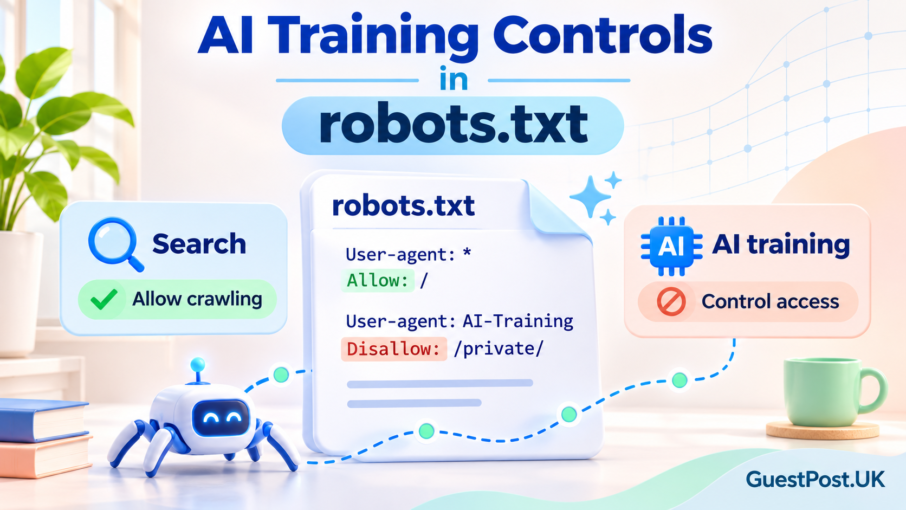
AI crawler controls are becoming a more practical topic for website owners, but they are also easy to misunderstand.
One setting may affect whether content is available for AI-model training. Another can affect how Google crawls a page. A different control may affect whether the page appears in Google Search at all. These are separate decisions, and treating them as the same thing can accidentally reduce useful search visibility.
This guide explains the distinction in plain English, including what Google-Extended does, what the new shared AI-training preference means, and what website owners should check before changing a robots.txt file.
AI training preferences are not the same as Search visibility
The first rule is simple: do not block a crawler until you know which product or outcome that rule affects.
Google Search, Google Images, Discover and other Search features depend on Googlebot being able to access and understand eligible pages. Blocking Googlebot broadly can reduce crawling and may affect how your content appears across Google Search experiences.
Google-Extended is different. Google describes it as a control that lets publishers manage whether content may be used for certain Gemini-model training and grounding purposes. Google also states that using Google-Extended does not affect a website’s inclusion or ranking in Google Search.
That means a business can decide not to allow its content to help train future Gemini models while still keeping pages available to Google Search. It is not an “AI SEO switch”, and it is not a replacement for sensible technical SEO.
For a fuller view of how ordinary SEO and AI-search visibility work together, read our Google AI Search Optimisation Guide.
What Google announced about shared AI training controls
On 30 October 2026, Google announced plans to support a shared machine-readable AI-training preference in robots.txt.
The purpose is to reduce the need for publishers to manage a separate rule for every AI company. Instead, a shared policy token is intended to let website owners express a broad training preference across participating providers.
Google has said that where a publisher uses the shared opt-out preference and does not specify Google-Extended separately, Google plans to interpret that as though Google-Extended had been disallowed.
The important word is plans. This is an emerging, industry-wide mechanism connected with ongoing standards work. Website owners should not rush to add an unfamiliar directive from a random blog post or template. Check the latest official documentation, confirm whether your CMS or hosting setup is handling the rule correctly, and decide what the preference means for your business.
The new shared signal is about AI-model training preferences. It does not automatically tell Google to remove a page from Search, hide a page from AI Overviews, or stop every AI system from accessing content.
Googlebot, Google-Extended, and noindex do different jobs
These controls are often discussed together, but they have different purposes.
Googlebot
Googlebot is Google’s main crawler for Search. Rules aimed at Googlebot can affect Google Search, including Search features such as Discover, Google Images and other eligible Search experiences.
Blocking Googlebot is a significant decision. It should generally be reserved for genuinely unimportant, duplicate, private or technically problematic areas of a website—not for normal service pages, blog posts, product pages or resources you want people to find.
Google-Extended
Google-Extended is a product token used to manage certain access related to Gemini training and grounding. Google says it is not used as a Search ranking signal, and its use does not affect a site’s inclusion in Google Search.
A website owner may consider this control when they want their content to remain searchable but do not want it used for the relevant Gemini training purposes.
That is a business and content-governance decision, not a shortcut to better rankings.
noindex
noindex is used when you want a page removed from Google Search results. It is applied through a robots meta tag or an HTTP response header.
For example, a private thank-you page, low-value search-result page, duplicate PDF or outdated campaign page may need noindex. However, Google must be allowed to crawl the page in order to see that instruction.
This is where many websites make a mistake: they block a URL in robots.txt and add noindex, but Google cannot crawl the page to discover the noindex directive.
robots.txt
A robots.txt file primarily manages crawler access. It helps control crawl activity, especially on large websites or when you have pages that shouldn’t be crawled repeatedly.
It is not a reliable way to remove normal web pages from Google Search. If another website links to a blocked URL, Google may still discover and show the URL without being able to access the page content.
Do not use AI crawler settings to solve unrelated SEO problems
A website may have duplicate pages, thin archive pages, old PDFs, internal-search URLs or unnecessary filter combinations. Those are real SEO issues, but an AI-training preference is not the right solution.
Instead, decide what outcome you need:
- Keep a page out of Search: use
noindex, remove the page or protect it with a login where appropriate. - Reduce crawling of low-value areas: review
robots.txt, internal linking, canonicals and parameter handling. - Limit snippets or specific text from appearing in Search: use supported snippet controls.
- Express an AI-training preference: review Google-Extended and the developing shared training-control standard.
- Improve eligibility for Search and AI-assisted discovery: publish useful, crawlable pages with clear structure and genuine expertise.
If you are unsure which control applies, start with a technical review rather than changing your robots.txt file immediately. Our technical SEO for AI search guide explains the wider checks that matter for crawlability, accessibility and useful AI-search visibility.
When might an AI training preference make sense?
There is no universal answer. The right approach depends on the type of content you publish and the value it creates.
A publisher with substantial original journalism, paid research or distinctive editorial archives may take a more restrictive approach to AI training. A business that relies on public educational content for discovery may decide that keeping content broadly accessible supports its wider marketing objectives.
Some organisations may choose a middle route:
- Keep important public pages accessible to Google Search
- Use normal
noindexcontrols for private or low-value pages - Review training preferences separately from Search visibility
- Monitor referral traffic, branded searches and Search Console performance
- Revisit the decision as standards and AI platforms develop
The key is to choose deliberately. Do not block valuable public content simply because an AI crawler control sounds protective, and do not assume that allowing access guarantees AI visibility, traffic or leads.
Before you edit robots.txt: a practical review process
A change to robots.txt should start with the outcome you want, not with a list of bot names copied from another website.
Use this quick decision guide:
- Want to remove a page from Google Search? Use
noindexor remove/password-protect it. Do not rely onrobots.txtalone. - Want genuinely private content protected? Use login or password protection.
- Want to reduce crawling of low-value areas such as filters or duplicate URL patterns? Review crawl management, canonicals and internal linking.
- Want to express a preference about AI model training? Review the official controls supported by the AI provider, including Google-Extended where appropriate.
- Want to limit how content appears in Google AI Overviews or AI Mode? Use Google Search’s existing preview controls; this is different from an AI-training preference.
Google confirms that Google-Extended does not affect ordinary Google Search inclusion or rankings. It is a separate control relating to use in Gemini training and some grounding scenarios.
A safe checklist for WordPress site owners
Before changing anything:
- Save a copy of your current
robots.txtfile and note who manages it: WordPress, an SEO plugin, hosting, a cache plugin or a developer. - Inspect it for existing rules affecting WordPress core files, uploads, search pages, tag archives, sitemap URLs and staging areas.
- Be clear about whether the goal is search visibility, privacy, crawl efficiency, snippet control or AI-training preference.
- Use documentation from the crawler owner, rather than a generic “block all AI bots” snippet.
- Test after publishing. For Google-related changes, use Search Console’s robots testing and URL Inspection tools where relevant.
- Record the date, reason, and change made so you can review the decision later.
A robots.txt file sits at the site’s root and applies to that particular host, protocol and port. A rule copied between http, https, www and non-`www` versions may not have the effect expected.
Common mistakes to avoid
Blocking Googlebot when the concern is AI training
This can unintentionally affect regular organic visibility. Googlebot is the crawler connected with Google Search, while Google-Extended is a separate product token. If the concern is training preferences, blocking all Google crawling is usually far broader than necessary.
Using robots.txt to hide a public page
robots.txt is not a security system. A URL can still be discovered through links, and crawlers can ignore directives. Protect sensitive information with authentication, not a crawler instruction.
Combining Disallow and noindex on the same page
Google needs to crawl a page to see its noindex instruction. If crawling is blocked first, the URL can remain visible in Search without Google reading the instruction you intended it to follow.
Treating AI-training controls as an AI-search ranking switch
A choice about model training does not automatically opt a page in or out of Google AI search features. Google’s documentation explains that controls such as nosnippet, data-nosnippet, max-snippet and noindex are the relevant options for controlling content presentation in Search’s AI features.
Installing a supposedly universal AI-bot block without checking it
Not every crawler uses the same directive, and support changes over time. Google announced on 30 October 2026 that it plans to support a shared AI-training preference in early 2027; it is a developing standard, not a reason to make rushed site-wide changes today.
The sensible approach for most business websites
For most established websites, the safest default is to keep search fundamentals stable: maintain crawlable, useful pages; protect private material properly; and use page-level search controls only where they serve a real purpose.
Then decide separately whether your business wants to express an AI-training preference. That is a commercial, legal and content-governance decision—not a shortcut to better rankings or an automatic defence against every form of AI use.
If your priority is visibility in emerging search experiences, concentrate first on clear answers, original expertise, accessible technical SEO and pages that genuinely help visitors. Our Google AI Search Optimisation Guide and technical SEO for AI search resources cover that practical side. For a wider technical review, see our SEO audit services.
Bottom line: keep AI-training preferences, Google Search visibility and private-content protection as three separate decisions. Make each one deliberately, document it, and review it as official controls evolve.