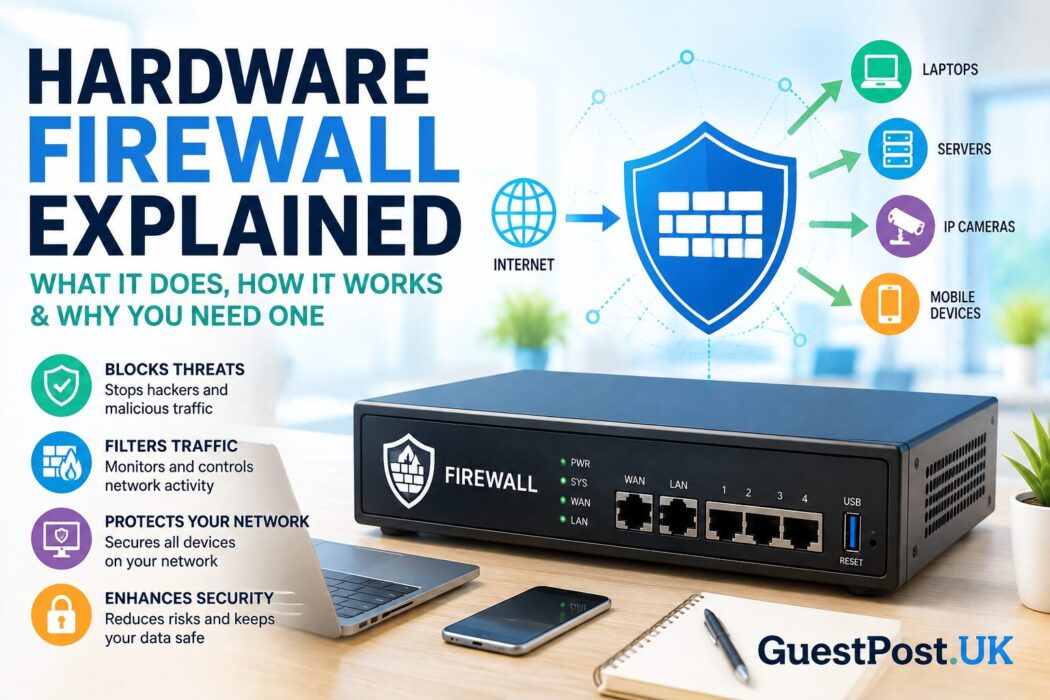
Why a Hardware Firewall Still Matters in Modern Cybersecurity
Whether you’re protecting a home Wi-Fi network, a growing business or an enterprise infrastructure, a firewall remains one of the most important layers of defence against cyber threats. Yet despite being a core component of network security for decades, many people still ask the same questions: what does a firewall do, what does a computer firewall do, and is a hardware firewall really necessary?
The short answer is yes. While operating systems now include built-in software firewalls, cyber attacks have become far more sophisticated. Threats such as ransomware, phishing campaigns, botnets and automated vulnerability scans constantly search the internet for exposed devices. A dedicated hardware firewall helps stop many of these threats before they ever reach your computers, servers or smart devices.
Unlike a software firewall, which protects a single computer, a hardware firewall sits between your network and the internet. Every connection entering or leaving your network passes through it, allowing the firewall to inspect traffic, enforce security rules and block suspicious activity in real time.
For businesses, this means protecting employees, customer data and critical systems from unauthorised access. For home users, it provides an additional layer of defence for everything connected to the network, including laptops, smartphones, gaming consoles, smart TVs and Internet of Things (IoT) devices.
Understanding how a hardware firewall works isn’t just useful for IT professionals. Business owners, remote workers and anyone responsible for network security can benefit from knowing what a firewall does, when it should be used and how it fits into a wider cybersecurity strategy.
What Is a Hardware Firewall?
A hardware firewall is a dedicated physical security device that monitors and filters network traffic travelling between the internet and a private network. It acts as the first checkpoint for every incoming and outgoing connection, deciding whether traffic should be allowed, restricted or blocked based on predefined security policies.
Unlike antivirus software, which focuses on detecting malicious files after they reach a device, a hardware firewall works at the network level. Its goal is to prevent potentially harmful traffic from reaching your systems in the first place.
A typical hardware firewall is positioned between your internet modem and your internal network. In many organisations, it also connects directly to routers, switches and wireless access points, creating a controlled gateway through which all internet traffic must pass.
A simple way to think about a hardware firewall
Imagine your office building has only one entrance.
Everyone entering must first pass through a professional security desk. Visitors with valid identification are allowed inside, while anyone without permission is refused entry. Suspicious behaviour is investigated before access is granted.
A hardware firewall performs the same role for your network. Instead of checking people, it inspects every data packet attempting to enter or leave your systems.
What information does a hardware firewall inspect?
Before allowing network traffic through, a firewall can examine factors such as:
- Source IP address
- Destination IP address
- Network ports
- Communication protocols
- Connection state
- Packet headers
- Traffic behaviour
- Security policies
- Known attack signatures (on advanced firewalls)
Based on these checks, the firewall determines whether the connection is legitimate or should be blocked.
What Does a Firewall Do?
One of the most searched cybersecurity questions is “what does a firewall do?” The answer is broader than simply “blocking hackers”.
A firewall continuously monitors network communications and applies security rules to every connection request. Its primary responsibility is to ensure that only authorised and safe traffic is permitted while potentially dangerous or unnecessary traffic is denied.
In practice, a firewall performs several critical security functions.
Prevents unauthorised access
One of the firewall’s most important jobs is preventing attackers from accessing devices connected to your network.
Cybercriminals regularly scan internet-connected systems looking for exposed services, weak passwords and vulnerable software. A properly configured hardware firewall blocks many of these unsolicited connection attempts automatically.
Filters network traffic
Not every connection request deserves access.
Firewalls evaluate incoming and outgoing traffic against predefined rules, allowing approved communications while rejecting those that violate security policies.
For example, a company may allow employees to browse websites using HTTPS while blocking unnecessary services that create additional security risks.
Monitors suspicious activity
Modern firewalls do much more than simply allow or deny traffic.
Many continuously analyse traffic patterns, looking for unusual behaviour such as:
- Unexpected spikes in network activity
- Repeated login attempts
- Communication with known malicious servers
- Large volumes of outbound data
- Abnormal application behaviour
This monitoring helps security teams identify threats before they develop into serious incidents.
Controls internet access
Many organisations use hardware firewalls to manage how employees access online services.
For example, administrators can:
- Restrict access to risky websites
- Block known malicious domains
- Prevent unauthorised software from connecting to the internet
- Limit certain online services during working hours
These controls improve both security and productivity.
Protects multiple devices simultaneously
One major advantage of a hardware firewall is that it secures an entire network rather than a single computer.
This means one firewall can protect:
- Desktop computers
- Laptops
- Servers
- Network printers
- Security cameras
- VoIP systems
- Smart TVs
- Mobile devices
- IoT equipment
As organisations continue adding connected devices, this centralised protection becomes increasingly valuable.
What Does a Computer Firewall Do?
Although people often use the terms interchangeably, a computer firewall usually refers to a software firewall installed on an individual operating system, such as Windows, macOS or Linux.
Rather than protecting the whole network, it focuses on monitoring traffic entering and leaving a specific device.
For example, if an unknown application suddenly attempts to send sensitive information to an unfamiliar server, the software firewall can:
- Block the connection automatically
- Request user permission
- Alert the user or administrator
- Record the activity for later investigation
This endpoint-level protection complements a hardware firewall rather than replacing it.
Many businesses adopt a layered security approach, using a hardware firewall to defend the network perimeter while software firewalls protect individual devices. If one layer misses a threat, another may still prevent it from causing damage.
This defence-in-depth strategy is widely recognised as one of the most effective ways to reduce cyber risk in modern networks.
How Does a Hardware Firewall Work?
To understand why a hardware firewall is so effective, it’s helpful to see what happens every time someone accesses your network.
Whenever data travels between the internet and your devices, it is broken down into small units known as packets. These packets contain information about where the data has come from, where it is going and what type of communication is taking place.
A hardware firewall analyses these packets before they reach your internal network. It compares each connection against a set of predefined security policies and decides whether the traffic should be allowed, restricted or blocked.
The process takes place in milliseconds and is repeated thousands—or even millions—of times every day on busy networks.
A typical firewall inspection process
Here’s a simplified view of how a hardware firewall handles network traffic:
- A device on the internet sends a connection request.
- The request reaches the hardware firewall before your network.
- The firewall examines the packet’s source, destination and protocol.
- It compares the request against configured security rules.
- If the traffic is considered safe, it is forwarded to the destination device.
- If the traffic appears suspicious or unauthorised, the firewall blocks it and may generate a security log or alert.
This process is completely automatic, allowing businesses to maintain security without interrupting legitimate network activity.
Firewall rules: the decision-making engine
Every firewall operates using a collection of security rules, often referred to as an Access Control List (ACL) or firewall policy.
These rules define what traffic is permitted and what should be denied.
For example, a business may configure rules such as:
- Allow employees to browse secure websites using HTTPS.
- Block remote access from unknown IP addresses.
- Permit VPN connections for authorised staff only.
- Deny traffic to unused network ports.
- Restrict access to internal servers from external networks.
Well-designed firewall rules strike a balance between security and usability. Rules that are too restrictive can disrupt legitimate business operations, while overly permissive rules increase the risk of cyber attacks.
Understanding stateful inspection
Modern hardware firewalls typically use stateful inspection, which is far more advanced than simply checking whether a packet should be allowed.
Instead of analysing each packet in isolation, the firewall keeps track of active network sessions. It determines whether incoming traffic belongs to an existing, legitimate connection or is an unexpected request that should be blocked.
For example, if you visit a trusted website, your browser initiates the connection. The firewall recognises the returning data as part of that authorised session and allows it through.
However, if an unknown computer suddenly attempts to connect directly to your device without permission, the firewall identifies the request as unsolicited and rejects it.
Stateful inspection provides stronger protection while reducing false positives that could interrupt normal internet use.
Types of Hardware Firewalls
Not all hardware firewalls provide the same level of protection. As cyber threats have evolved, firewall technology has become more sophisticated, offering different methods of inspecting and controlling network traffic.
Understanding these types can help you choose the right solution for your home or business.
Packet Filtering Firewalls
Packet filtering is one of the earliest firewall technologies and remains the foundation of many modern systems.
It evaluates each packet individually using information such as:
- Source IP address
- Destination IP address
- Port number
- Communication protocol
If the packet matches an approved rule, it is allowed through. Otherwise, it is rejected.
Advantages
- Fast processing
- Low hardware requirements
- Suitable for simple network environments
Limitations
- Limited visibility into the contents of traffic
- Cannot identify many modern cyber threats
- Less effective against sophisticated attacks
Stateful Inspection Firewalls
Stateful firewalls improve on packet filtering by keeping track of active network connections.
Rather than treating every packet independently, they understand the context of each communication session.
This approach offers several advantages:
- Better protection against unauthorised connections
- Fewer unnecessary blocks
- Improved performance for legitimate traffic
- Stronger overall network security
Today, stateful inspection is considered the minimum standard for most business-grade firewalls.
Proxy Firewalls
A proxy firewall acts as an intermediary between users and external services.
Instead of allowing devices to communicate directly with websites or servers, the firewall receives the request first, inspects it and then establishes a separate connection on the user’s behalf.
This architecture provides several security benefits:
- Hides internal IP addresses
- Adds another layer of isolation
- Enables detailed content filtering
- Improves privacy
The trade-off is that proxy firewalls may introduce slightly higher latency because every connection passes through an additional processing stage.
Next-Generation Firewalls (NGFW)
As cyber threats have become more complex, traditional firewalls alone are no longer sufficient for many organisations.
This has led to the development of Next-Generation Firewalls (NGFWs), which combine traditional firewall functionality with advanced security capabilities.
Common NGFW features include:
- Deep Packet Inspection (DPI)
- Intrusion Prevention Systems (IPS)
- Malware detection
- Application awareness
- User identity controls
- SSL/TLS encrypted traffic inspection
- Threat intelligence feeds
- Sandboxing for suspicious files
- Centralised security reporting
Rather than simply deciding whether traffic should be allowed, an NGFW attempts to understand what the traffic contains and whether it represents a genuine security threat.
For businesses handling sensitive customer information or operating in regulated industries, these additional capabilities provide significantly stronger protection.
Hardware Firewall vs Software Firewall
Many people assume that a hardware firewall replaces a software firewall, but the reality is quite different.
They serve different purposes and are most effective when used together.
| Feature | Hardware Firewall | Software Firewall |
|---|---|---|
| Location | Physical device between the internet and your network | Installed on an individual computer or server |
| Protection | Entire network | Single device |
| Management | Centralised | Managed per device |
| Performance | Uses dedicated hardware | Uses the device’s own resources |
| Best for | Businesses, offices and advanced home networks | Individual users and endpoint protection |
| Cost | Higher initial investment | Often included with the operating system |
Which one should you choose?
For most home users, the built-in firewall included with Windows or macOS provides a good level of baseline protection.
However, businesses with multiple employees, shared resources, or customer data should strongly consider deploying a dedicated hardware firewall.
The strongest cybersecurity strategy combines both technologies.
A hardware firewall secures the network perimeter, while software firewalls protect individual devices. If one layer fails to stop a threat, another layer may still prevent the attack from succeeding.
This layered approach—often referred to as defence in depth—is widely adopted across modern organisations because it significantly reduces the overall risk of security breaches.
Why Businesses Choose Hardware Firewalls
As organisations become increasingly reliant on cloud services, remote working and connected devices, protecting the network perimeter is more important than ever. A hardware firewall offers centralised security that scales far beyond what individual software firewalls can provide.
Whether you’re running a small office or managing multiple business locations, a dedicated firewall helps reduce risk while giving IT teams greater visibility and control over network activity.
Protects Every Device on the Network
One of the biggest advantages of a hardware firewall is that it secures the entire network rather than a single endpoint.
Instead of installing security software on every device and managing them individually, a hardware firewall provides a unified layer of protection for everything connected to your network, including:
- Desktop computers
- Laptops
- File and application servers
- Wireless access points
- VoIP phone systems
- CCTV and security cameras
- Network printers
- Smart office equipment
- Internet of Things (IoT) devices
As organisations continue to add connected devices, this centralised approach becomes easier to manage and far more efficient.
Reduces the Risk of Cyber Attacks
Cybercriminals constantly scan the internet for vulnerable systems. Common threats include:
- Ransomware
- Brute-force login attacks
- Distributed Denial-of-Service (DDoS) attacks
- Malware downloads
- Botnet activity
- Port scanning
- Exploitation of unpatched services
A properly configured hardware firewall can block many of these threats before they reach internal systems, significantly reducing the organisation’s attack surface.
It’s important to note that no firewall can stop every cyber attack. However, when combined with endpoint protection, regular software updates and user awareness training, it forms a critical part of a layered security strategy.
Improves Network Visibility
Modern firewalls don’t just block traffic—they provide valuable insights into what’s happening across your network.
Administrators can monitor:
- Which devices are generating the most traffic
- Which applications are being used
- Unusual login attempts
- Blocked connection requests
- Bandwidth usage
- Potential security incidents
These logs are invaluable for troubleshooting performance issues, identifying suspicious behaviour and supporting compliance requirements.
Supports Secure Remote Working
Remote and hybrid working have become standard for many organisations. Employees regularly connect to business systems from home, hotels or public Wi-Fi networks.
Many hardware firewalls include built-in Virtual Private Network (VPN) capabilities, enabling staff to establish encrypted connections to company resources.
This helps ensure that sensitive information remains protected, even when employees are working outside the office.
Simplifies Security Management
Managing security across dozens or hundreds of devices can quickly become complex.
A hardware firewall allows administrators to:
- Create central security policies
- Apply rules consistently across the organisation
- Update configurations from one interface
- Monitor network activity in real time
- Generate compliance and audit reports
This centralised management saves time and reduces the likelihood of configuration errors.
Are There Any Limitations?
While hardware firewalls provide excellent protection, they are not a complete cybersecurity solution. Understanding their limitations is just as important as understanding their strengths.
Initial Cost
Unlike software firewalls, which are often included with an operating system, hardware firewalls require dedicated equipment.
Costs vary depending on factors such as:
- Network size
- Performance requirements
- Number of users
- Security features
- Vendor licensing
For small businesses, however, the investment is often justified by the additional protection and centralised management they provide.
Configuration Matters
A firewall is only as effective as its configuration.
Poorly designed security rules can lead to:
- Legitimate services being blocked
- Security gaps that attackers can exploit
- Performance bottlenecks
- Unnecessary complexity
For this reason, organisations should review firewall rules regularly and remove outdated or unused policies.
Maintenance Is Ongoing
Like any security device, hardware firewalls require regular maintenance.
Best practices include:
- Installing firmware updates
- Reviewing security logs
- Updating firewall policies
- Monitoring performance
- Backing up configurations
- Testing security controls
Neglecting maintenance can leave even expensive firewall appliances vulnerable to newly discovered threats.
They Cannot Stop Every Threat
A common misconception is that installing a firewall makes a network completely secure.
In reality, firewalls cannot prevent:
- Employees clicking phishing links
- Weak or reused passwords
- Insider threats
- Social engineering attacks
- Malware introduced via infected USB devices
- Vulnerabilities within trusted applications
This is why cybersecurity should always involve multiple layers of protection rather than relying on a single technology.
Do Home Users Need a Hardware Firewall?
For many households, the answer depends on how the internet is used.
Most modern broadband routers already include basic firewall functionality, which provides a reasonable level of protection for everyday browsing, streaming and online shopping.
However, a dedicated hardware firewall may be worth considering if you:
- Run a home business
- Store sensitive client information
- Host servers at home
- Use advanced smart home systems
- Need secure remote access
- Manage multiple networks
- Require greater control over internet traffic
Power users, IT professionals and small business owners often benefit from business-grade firewall appliances because they offer more advanced security features than standard consumer routers.
Choosing the Right Hardware Firewall
Selecting the right firewall isn’t simply about buying the most expensive device. The best choice depends on your organisation’s size, budget and security requirements.
When comparing hardware firewalls, consider the following factors.
Performance
The firewall should comfortably handle your internet connection speed without creating bottlenecks.
Pay attention to:
- Maximum throughput
- Concurrent connections
- VPN performance
- Inspection speed
Security Features
Not all firewalls offer the same capabilities.
Look for features such as:
- Stateful inspection
- Deep Packet Inspection (DPI)
- Intrusion Prevention System (IPS)
- VPN support
- Malware filtering
- Web filtering
- Application control
- SSL inspection
- Threat intelligence integration
Ease of Management
A clear management interface makes ongoing administration much easier.
Business users should also consider:
- Cloud management options
- Centralised monitoring
- Reporting tools
- User-based access controls
- Automated updates
Scalability
Choose a solution that can grow with your organisation.
If your business expands from 20 employees to 100, your firewall should be capable of handling additional users, devices and network traffic without requiring a complete replacement.
Popular Hardware Firewall Vendors
Several vendors have established strong reputations within the cybersecurity industry.
Some of the most widely used include:
| Vendor | Best For |
|---|---|
| Cisco Secure Firewall | Large enterprises and corporate environments |
| Fortinet FortiGate | Businesses of all sizes with advanced security needs |
| Palo Alto Networks | Enterprise security and next-generation firewall features |
| Sophos Firewall | Small and medium-sized businesses |
| SonicWall | SMBs requiring comprehensive network protection |
| WatchGuard | Managed service providers and distributed organisations |
| Netgate (pfSense) | Cost-effective, highly configurable open-source deployments |
| Ubiquiti UniFi Gateway | Small offices and advanced home networks |
Each platform has its own strengths, licensing model and management experience, so it’s worth comparing features against your specific requirements rather than choosing based on brand alone.
Hardware Firewall Use Cases: When Is It the Right Choice?
A hardware firewall is not reserved for large corporations with dedicated IT departments. Today, organisations of all sizes rely on network firewalls to secure their systems, whether they have ten employees or ten thousand.
The key is understanding where a hardware firewall delivers the greatest value.
Small Businesses
Small businesses are increasingly targeted by cybercriminals because they often have fewer security controls than larger organisations.
A hardware firewall helps protect:
- Customer databases
- Financial records
- Email systems
- Shared file servers
- Office Wi-Fi networks
- Employee devices
For example, a marketing agency with 20 staff members may have laptops, smartphones, network storage and cloud applications connected simultaneously. Rather than securing each connection individually, a hardware firewall monitors and filters all traffic entering and leaving the office network.
Medium and Large Enterprises
As organisations grow, managing cybersecurity becomes more complex.
Multiple offices, remote workers, cloud infrastructure and third-party integrations all increase the attack surface.
Enterprise-grade hardware firewalls provide capabilities such as:
- Network segmentation
- Centralised policy management
- High availability and redundancy
- Site-to-site VPNs
- Identity-based access control
- Advanced threat prevention
- Compliance reporting
These features help organisations maintain consistent security policies across multiple locations.
Educational Institutions
Schools, colleges and universities support thousands of users and devices every day.
A hardware firewall enables IT teams to:
- Separate student and staff networks
- Block malicious websites
- Protect administrative systems
- Monitor unusual network activity
- Manage internet access policies
This improves both security and network performance.
Healthcare Organisations
Hospitals, clinics and medical practices process highly sensitive patient information.
A hardware firewall helps protect:
- Electronic health records
- Appointment systems
- Connected medical devices
- Staff workstations
- Remote access services
Combined with encryption and strict access controls, firewalls play an important role in helping healthcare organisations meet data protection and regulatory requirements.
Remote and Hybrid Workforces
Remote working has become standard across many industries.
Employees frequently connect from home networks, hotels, airports and public Wi-Fi hotspots.
A business-grade hardware firewall with VPN functionality allows staff to establish encrypted connections back to the corporate network, reducing the risk of data interception while working remotely.
Common Firewall Mistakes to Avoid
Installing a hardware firewall is only the first step. Poor configuration or outdated security policies can significantly reduce its effectiveness.
Here are some of the most common mistakes organisations make.
Leaving Default Settings Unchanged
Many firewall appliances are shipped with default administrator usernames, passwords or configuration templates.
Failing to change these settings can leave the device unnecessarily exposed.
Always:
- Change default credentials immediately.
- Disable unused services.
- Apply the latest firmware updates.
- Review default firewall policies.
Allowing Too Many Open Ports
Every open network port creates another potential entry point.
Over time, organisations often accumulate firewall rules that are no longer required.
Regularly auditing firewall policies helps ensure that only essential ports and services remain accessible.
Ignoring Firmware Updates
Firewall vendors regularly release updates to address newly discovered vulnerabilities and improve security features.
Running outdated firmware can expose the firewall itself to attack, potentially undermining the protection it is supposed to provide.
Where possible, establish a routine maintenance schedule to review and apply updates.
Failing to Monitor Logs
A firewall can generate thousands of events every day, but those logs are only useful if someone reviews them.
Monitoring firewall logs helps identify:
- Repeated failed login attempts
- Unusual traffic spikes
- Blocked malware communications
- Port scanning activity
- Misconfigured services
Many organisations integrate firewall logs with Security Information and Event Management (SIEM) platforms to improve visibility and accelerate incident response.
Relying on the Firewall Alone
Perhaps the biggest mistake is assuming that a firewall provides complete protection.
Cybersecurity is most effective when multiple security controls work together.
A strong security strategy should also include:
- Endpoint protection
- Multi-factor authentication (MFA)
- Email security
- Regular software updates
- Strong password policies
- Secure data backups
- Employee cybersecurity awareness training
A firewall forms an essential layer of defence, but it should never be the only one.
Firewall Protection in Practice: A Real-World Scenario
Consider a small accounting firm with 35 employees.
The business stores confidential financial records, provides remote access for staff and communicates with clients through cloud-based accounting software.
Without a hardware firewall:
- Internet traffic reaches internal systems with minimal filtering.
- Remote access may be exposed directly to the internet.
- Suspicious connection attempts are harder to detect.
- Security policies vary between individual devices.
After deploying a next-generation hardware firewall:
- Unauthorised connection attempts are blocked automatically.
- Remote employees connect securely through a VPN.
- Malicious websites are filtered before employees can access them.
- Network activity is monitored from a central dashboard.
- Security logs help identify unusual behaviour quickly.
The firewall does not eliminate every cyber risk, but it significantly strengthens the organisation’s overall security posture and reduces opportunities for attackers.
Hardware Firewall vs Software Firewall: Which Should You Prioritise?
One of the most common questions businesses ask is whether they should invest in a hardware firewall or rely on software firewalls already included with their operating systems.
The answer depends on the size and complexity of your environment.
| Scenario | Recommended Solution |
|---|---|
| Home user with a single computer | Software firewall is usually sufficient |
| Family with multiple connected devices | Router firewall plus software firewalls |
| Small business | Dedicated hardware firewall with endpoint protection |
| Medium-sized organisation | Next-generation hardware firewall and endpoint security |
| Enterprise | Layered security with hardware firewalls, endpoint protection, intrusion prevention and continuous monitoring |
Rather than choosing one over the other, most cybersecurity professionals recommend using both.
A hardware firewall protects the network perimeter, while software firewalls monitor individual devices. Together, they provide multiple opportunities to detect and stop malicious activity before it causes damage.
Key Takeaways
Choosing the right firewall is less about buying the most expensive appliance and more about understanding your security requirements.
A dedicated hardware firewall offers centralised protection, improved visibility and greater control over network traffic, making it an excellent investment for businesses and organisations that handle sensitive data or support multiple users.
For home users, the firewall built into a modern router may be adequate for everyday activities. However, those running home offices, managing servers or requiring advanced network controls may benefit from upgrading to a dedicated hardware firewall.
Regardless of the environment, the most effective approach is always layered security. Firewalls work best when combined with regular updates, strong authentication, endpoint protection and informed users who understand basic cybersecurity risks.
Frequently Asked Questions
What does a hardware firewall do?
A hardware firewall monitors and filters network traffic between the internet and your private network. It blocks unauthorised connections, allows legitimate traffic and helps protect all connected devices from many common cyber threats.
What is the difference between a hardware firewall and a software firewall?
A hardware firewall protects an entire network from a dedicated physical device, whereas a software firewall is installed on an individual computer or server to monitor traffic to and from that specific device.
Does every home need a hardware firewall?
Not necessarily. Most home routers include basic firewall functionality that is suitable for general internet use. A dedicated hardware firewall is typically more beneficial for home businesses, advanced users or networks with higher security requirements.
Can a hardware firewall stop hackers?
A hardware firewall can block many unauthorised access attempts and reduce the risk of cyber attacks, but it cannot prevent every type of threat. Effective cybersecurity also requires software updates, strong passwords, multi-factor authentication and user awareness.
Is a hardware firewall better than antivirus software?
They serve different purposes. A hardware firewall controls network traffic before it reaches your devices, while antivirus software detects and removes malicious files that may already be on a system. For the best protection, both should be used together.
Making the Right Firewall Choice
Understanding what a firewall does is the first step towards building a more secure network. A hardware firewall provides far more than simple traffic filtering—it creates a controlled gateway that protects devices, monitors network activity and helps defend against an ever-growing range of cyber threats.
For businesses, investing in a properly configured hardware firewall is a practical way to strengthen security, support remote working and improve visibility across the network. Home users with more advanced requirements can also benefit from the additional protection and control these devices offer.
Ultimately, no single security solution can eliminate every risk. The strongest defence comes from combining a hardware firewall with endpoint protection, regular system updates, secure authentication practices and ongoing cybersecurity awareness. Together, these measures create a resilient foundation capable of protecting modern networks against today’s evolving threat landscape.